For my final project, I worked with the R programming language to process, analyze and visualize the States data set from John Fox's carData package. This R package contains multiple different data sets in dataframe-format, I inspected a large number (possibly a majority) of these data sets before deciding on using the States data set. The States data set contains information about each (including DC) US state's SAT scores and other potentially relevant variables with data that I believe the project collected from 1995.
I had hypothesized that increases made to things such as state funding of public education and teachers' salaries would lead to increases in these states' students' test scores. There are a few related studies and scholarly articles that have previously been published and are at least slightly more than just tangent to this issue. I will discuss a few of these external resources after I go over the code and its resultant visualizations.
As follows is the code I wrote in R for this project:
# Title : Final Project
# Objective : Retrieve, process, analyze and visualize interest-relevant data.
# Created by: Blake Rosenberg
# Created on: 4/25/2021
library(carData)
library(ggplot2)
data <- States
data$state <- row.names(data)
data <- data[, c('state', 'region', 'pop', 'SATV', 'SATM', 'percent', 'dollars', 'pay')]
row.names(data) <- NULL
# head(data)
corr_coef <- round(cor(data$pay, data$SATV), 2)
ggplot(data=data, aes(`pay`, `SATV`)) +
geom_point() +
geom_smooth()+
ggtitle("Correlations Between Teacher Salary and SAT Verbal Scores") +
labs(subtitle = paste("r = ", corr_coef)) +
theme(plot.subtitle = element_text(hjust=0.5,size=12, face="italic"), plot.title = element_text(hjust=0.5))
ggplot(data=data, aes(`dollars`, `SATV`)) +
geom_point() +
geom_smooth() +
ggtitle("Correlations Between Public Education Funding and SAT Verbal Scores") +
labs(subtitle = paste("r = ", round(cor(data$dollars, data$SATV), 2))) +
theme(plot.title = element_text(hjust=0.5), plot.subtitle = element_text(hjust=0.5,size=12,face="italic"))
ggplot(data=data, aes(`pay`, `percent`)) +
geom_point() +
geom_smooth() +
ggtitle("Correlations Between Teacher Salary and Percentage of Graduating Students Taking The SAT") +
labs(subtitle = paste("r = ", round(cor(data$pay, data$percent), 2))) +
theme(plot.title=element_text(hjust=0.5), plot.subtitle=element_text(hjust=0.5,size=12,face="italic"))
ggplot(data=data, aes(`percent`, `SATV`)) +
geom_point() +
geom_smooth() +
ggtitle("Correlations Between Percentage of Graduating Students Taking The SAT and Their Verbal Scores") +
labs(subtitle=paste("r = ", round(cor(data$percent, data$SATV), 2))) +
theme(plot.title=element_text(hjust=0.5), plot.subtitle=element_text(hjust=0.5,size=12,face="italic"))
This code creates four visualizations, all of which are scatter plots with their relevant correlation coefficients (Pearson's r) labeled on the subtitle element of the plot. The first visualization is a scatter plot attempting to demonstrate correlations between teacher salaries and scores on the verbal section of the SAT from graduating students, all of which is grouped by state.

The previous scatter plot depicts a moderate-strength, negative correlation between teacher salary and verbal scores on the SAT. In other words, as salaries for educators increase, there often exists a similarly-sized decrease in scoring.

The previous scatter plot depicts a moderate-strength, negative correlation between states' funding of public education and their students' scores on the verbal section of the SAT. In other words, as states increase their levels of funding towards public education, there often exists a similarly-sized decrease in the same states' students' SAT scores.

The previous scatter plot depicts a moderate-strength (nearly strong-strength), positive correlation between teachers' salaries and the percentage of graduating students taking the SAT. In other words, as wages increase, there usually exists a similarly-sized increase in the percentage of graduating students taking the SAT within the same states.

The previous, final scatter plot demonstrates a very strong, negative correlation between the percentage of graduating students taking the SAT and their respective scores on the verbal section of the exam. In other words, as the percentage of graduating students taking the SAT in a given state increases, there nearly always exists a similarly-sized decrease in their scores on the verbal section of the exam.
The first two of these four visuals proves that my hypothesis was incorrect. Increases in wages and/or funding alone do not correlate to increases in standardized test scores. In fact, the opposite appears to be true. There are a handful of potential explanations here for why this is the case; of course, there simply cannot be a causal relationship in which cutting salaries would suddenly improve test scores within the same schools. The final two visualizations help to establish a basis for claims against the potential for skewed means due to extreme values in smaller sample sizes; clearly, the average score is actually lower in the states where the sample size (percent of students taking the exam) is greater, despite their inherent statistical nature to be less skewed by extreme values.
The simplest explanation for a negative correlation between funding/salaries and SAT scores is that schools must provide greater pecuniary incentives to encourage educators to participate in their workforce if these schools' students are more difficult to teach to. Some states may see higher numbers of such schools, thereby simultaneously increasing average educator wages while still failing to improve test scores. In other words, these very same schools which demonstrate higher paid (when compared to other states) teachers but low test scores would be very likely to demonstrate just as low of test scores still even if the teachers were paid less.
However, as many scholars would be quick to point out, the most impactful factors at play here are those socioeconomic factors most directly related to the students themselves. There have been studies that demonstrated the highly correlated relationship between familial income and student test scores in the past. Such higher privilege inherently accompanies such things as the ability to afford not only better, but any, tutoring than other students whose families net income is lesser. Theoretically, this may also present with underlying psychological factors such as cognitive distortion in which students believe that, because their family has a low income and is impoverished, that they aren't likely to succeed as adults themselves and therefore may potentially apply themselves less than students who have not faced abrasivity and likely do not have a reference for this concept; however, during my research, I did not encounter research either supporting or refuting such an idea.
Yet other concepts and plausible explanations for the relationships demonstrated in my project are available from such scholarly writings as Loeb and Page's paper on alternative labor markets and student success (https://cepa.stanford.edu/sites/default/files/loebpage.pdf).
As a few final closing notes: inflation and limited time frame from original data set both hindered the potential for this project. The former is the easiest to resolve: assuming that my belief was correct and the data for this data set was polled from 1995, the rate to calculate cumulative inflation to date would be about 78%; alternatively, one can just double the dollar figures presented in the data set to get a rough estimate of the equivalent under today's economy. Now, the latter concern is not quite so simple. I would be able to leverage more insight with this project if the data set offered more than just (presumably) 1995's data; ideally, multiple consecutive years worth of data. This could enable the forecasting of data as well as just a more definitive analysis on the correlative relationships present amongst the different variables from the States data set.
This week's assignment was to explore the package animation in R. More specifically, to create a simple animated visualization through the use of this package. As I was using a new package for the first time for this assignment, I had a lot of ideas but could not keep most of them simple in the end. As a result, I borrowed from the dataset "datasauRus" and modified the data in a short for loop as shown in the code below:
# Title : Module 13
# Objective : Create an animated visualization using Yihui Xie's animation package.
# Created by: Blake Rosenberg
# Created on: 4/11/2021
library(animation)
library(datasauRus)
ani.options(interval=0.25)
saveGIF({
layout(matrix(c(1, rep(2,5)), 100, 100))
par(mar=c(4,4,2,1) + 0.1)
for (i in 1:100) {
plot(abs(datasaurus_dozen$x-i), abs(datasaurus_dozen$y-i))
}
})
This short snippet creates the following animation which plays back at about four frames per second (the 0.5 interval demonstrated by Bryan from R Bloggers was far too choppy to use here).
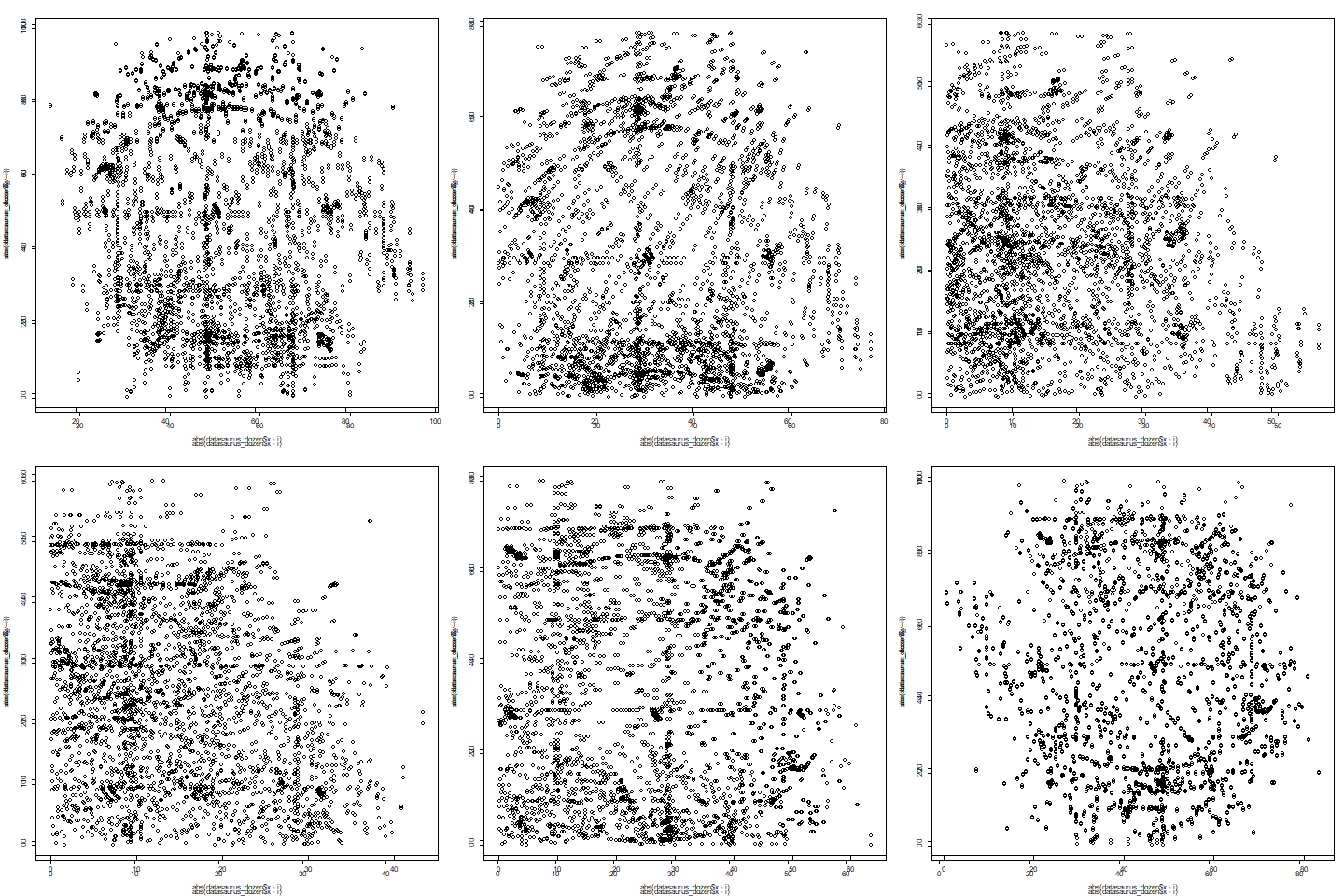
I liked how this looks, almost like a Brownian Motion at about halfway through. However, as I was using the base plot function within a loop, R insists on adding multiple labels to the graph (including a rendered animation for the axes' tick marks too). These sorts of things are nuances I've encountered occasionally in R. However, I would normally use the ggplot2 package for plotting visuals instead of sticking with R base functions as they tend to require a lot of hiding labels and then rendering them separately later on, in order to prevent visual glitches like the ones seen in the above animation. However, switching to ggplot2 for animated visuals in R sidesteps the necessity of using the animation package because ggplot2 works quite well with the gganimation package alongside gifski for archiving the renderings into GIFs.
For this week's assignment, I've written the following in R in order to create a social network styled visualization of the theme elements that are involved in a ggplot2 visualization:
# Title : Module 12
# Objective : Social Network visual analysis under ggnet2 and ggplot2.
# Created by: Blake Rosenberg
# Created on: 4/3/2021
library("GGally")
library("network")
library("sna")
library("ggplot2")
# net <- rgraph(10, mode="graph", tprob=0.5)
# net <- network(net, directed=F)
# net <- network(rgraph(10, mode="graph", tprob=0.5), directed=F)
# ggnet2(net)
# ggnet2(net, node.size=6, node.color="black", edge.size=1, edge.color="grey", label=T)
data(theme_elements, package='geomnet')
net <- network(theme_elements$edges[, 1:2], directed=F)
rownames(theme_elements$vertices) <- theme_elements$vertices$label
net %v% "name" <- as.character(theme_elements$vertices[network.vertex.names(net), "Name"])
set.seed(73974567)
ggnet2(net, label=T, size=2, vjust=-0.6, mode="kamadakawai", label.size=3) +
ggtitle("Parts of a Graph") +
theme(plot.title = element_text(hjust=0.5))
Setting a seed was done primarily to keep things consistent when adjusting other settings in order to produce the following visual:
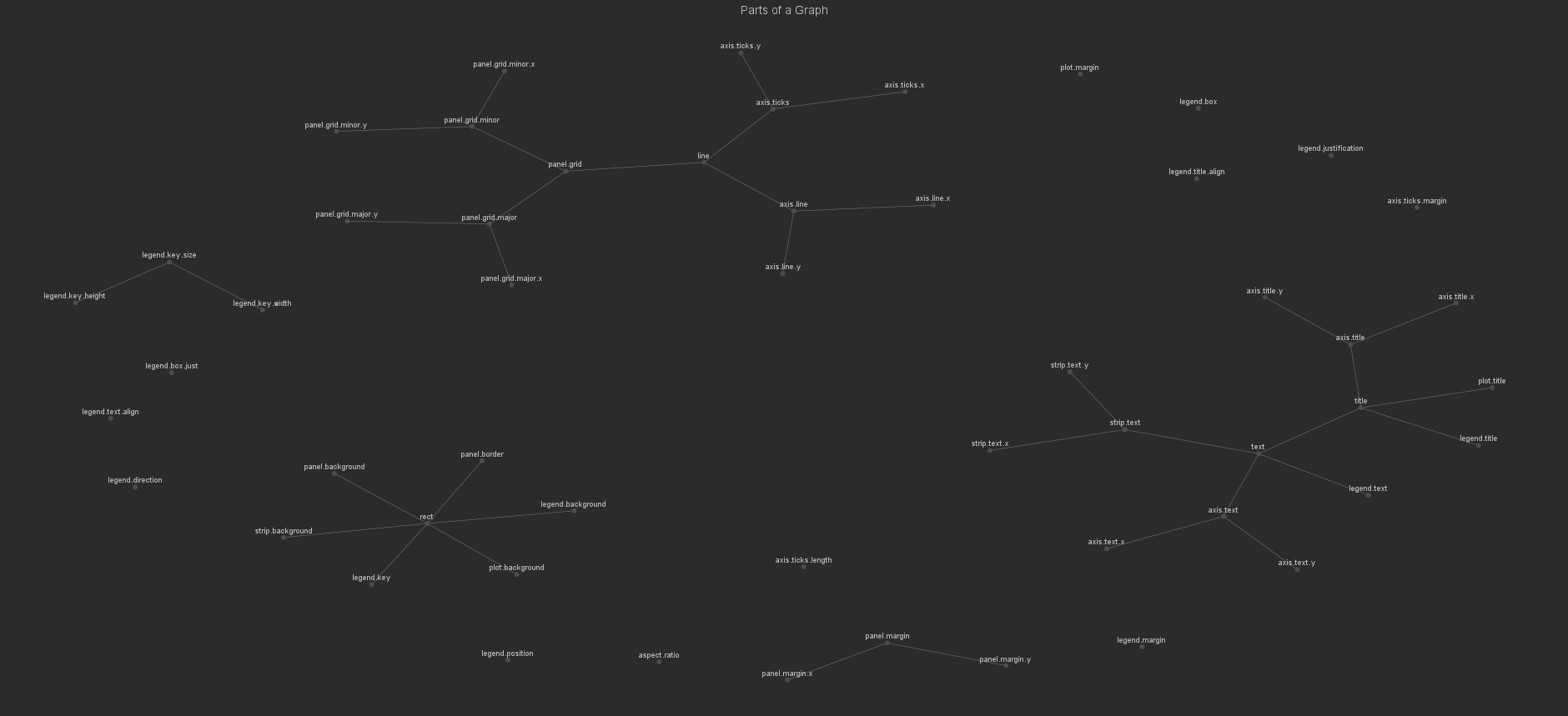
I wanted to wrap this visual up by programmatically setting node colors based on the number of relationships they were associated with (for example, everything under the legend.key.X nodes would share a color and this same color could be shared with any other group of three). However, this quickly proved fruitless. The main blocking factor in finding information on performing this myself was all of the different terminology associated with ggnet2. I simply could not find an approach to counting the relationships in a network object in R. I did, however, find this assignment very interesting and insightful. I love these kinds of visuals more than I do regular charts and graphs but I rarely have the opportunity to make anything quite like this!
For this week's assignment I wrote the following code in R in order to create a Tufte-styled dot-dash histogram of data prescribed by the assignment while using ggplot2:
# Title : Module 11
# Objective : Generate a dot-dash scatterplot using ggplot2
# Created by: Blake Rosenberg
# Created on: 3/28/2021
library("ggplot2")
library("CarletonStats")
library("devtools")
library("epanetReader")
library("fmsb")
library("ggthemes")
library("MASS")
library("PerformanceAnalytics")
library("psych")
library("plyr")
library("prettyR")
library("plotrix")
library("proto")
library("RCurl")
library("reshape")
library("reshape2")
x <- 1967:1977
y <- c(0.5,1.8,4.6,5.3,5.3,5.7,5.4,5,5.5,6,5)
pdf(width=10, height=6)
plot(y ~ x, axes=F, xlab="", ylab="", pch=16, type="b")
axis(1, at=x, label=x, tick=F, family="serif")
axis(2, at=seq(1,6,1), label=sprintf("$%s", seq(300,400,20)), tick=F, las=2, family="serif")
abline(h=6,lty=2)
abline(h=5,lty=2)
text(max(x), min(y)*2.5,"Per capita\nbudget expanditures\nin constant dollars", adj=1,
family="serif")
text(max(x), max(y)/1.08, labels="5%", family="serif")
dev.off()
df <- data.frame(x,y)
colnames(df) <- c('Year', 'Expenditure')
ggplot(df, aes(Year, Expenditure)) +
geom_point() +
geom_rug() +
theme_tufte(ticks=F) +
xlab("Year") +
ylab("Expenditure") +
ggtitle("Per Capita Budget Expenditures In Constant Dollars") +
theme(axis.title.x = element_text(vjust=-0.5), axis.title.y=element_text(vjust=-0.5),
plot.title=element_text(hjust=0.5)) +
scale_x_continuous(breaks=x) +
scale_y_continuous(breaks=y)
The resultant plot is shown below.
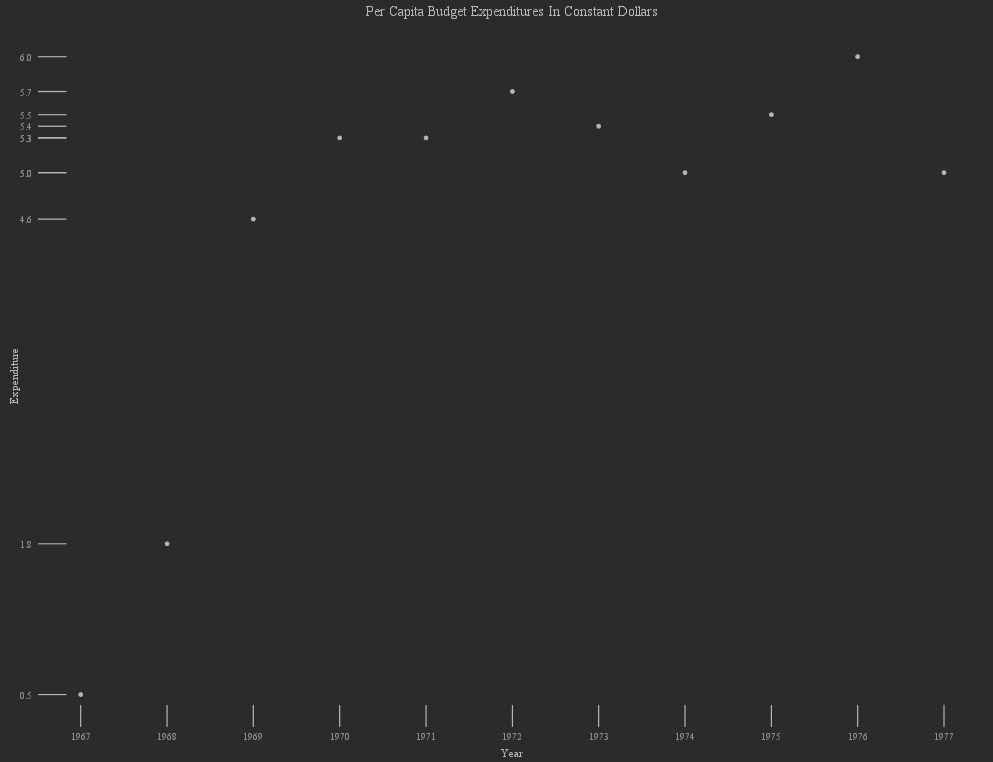
This assignment allowed me to explore new approaches for visualizing data. I personally found the resultant visuals, among the options I had to select from, rather unappealing and quite clunky. The one nice thing I can agree on about this specific visual that I created is that the y-axis tick marks are well done, and don't show the numerous values in between themselves which were not present in the data. However, this was done by scaling the axes continuously and explicitly specifying the breaks; which could be done for a normal scatter plot as well.
For this week's assignment, I wrote the following code in R for plotting Covid-19 time series data that I retrieved from John Hopkins (Shad Reynolds (2021). COVID-19 Time Series Data [Dataset]. https://data.world/shad/covid-19-time-series-data):
# Title : Module 10
# Objective : Time Series Analysis
# Created by: Blake Rosenberg
# Created on: 3/19/2021
library("ggplot2")
library("lubridate")
library("dplyr")
df <- read.csv("shad-covid-19-time-series-data/data/confirmed.csv")
cnames <- sub('X', '', names(df))
cnames.A <- cnames[1:3]
cnames.C <- tail(cnames, 1)
cnames.B <- cnames[4:(length(cnames)-1)]
cnames.B <- mdy(cnames.B)
cnames <- c(cnames.A, cnames.B, cnames.C)
names(df) <- cnames
df.ts.date <- names(df)[4:(length(names(df))-1)]
df.ts.cnames <- df$country_region
df.ts <- data.frame(df[4:(length(names(df))-1)], row.names=make.names(df.ts.cnames, unique = T))
names(df.ts) <- df.ts.date
df.ts <- as.data.frame(t(df.ts))
plot_XToY_days_of_region <- function(data=df.ts, dates=cnames.B, days.x, days.y, region) {
FORMAT <- "%b %e %Y"
data <- slice(data, days.x:days.y)
region.pretty <- sub("(?<=\\w)\\.\\w*", "", region, perl=T)
ggplot(data) +
geom_bar(aes(x=dates[days.x:days.y], y=get(region, data)), stat='identity', fill="black") +
labs(title=sprintf("COVID-19: Confirmed Cases (%s)", region.pretty),
subtitle = paste(format(dates[days.x], format=FORMAT), "To", format(dates[days.y], format = FORMAT))) +
xlab("Date") + ylab("Confirmed Cases") +
scale_x_date(date_labels = "%b %d") +
theme(plot.title = element_text(hjust = 0.5), plot.subtitle = element_text(hjust = 0.5, size=13.5))
}
plot_XToY_days_of_region(days.x=1, days.y=31, region="China.1")
plot_XToY_days_of_region(days.x=45, days.y=62, region="Argentina")
First, a quick breakdown of this code. I instantiate my original data frame, df, by reading in the CSV file pertaining to confirmed cases. I then munge the data through a few different steps. First, I remove "X" from column names. I then separate out these column names into three lists: one containing just the first 3 columns (region, latitude, and longitude), one containing the dates for the records, and one containing the final column (location). Before these three lists are concatenated and used to replace the original names, I format the dates as such. I then transpose the data frame and store the data-frame-casted object in df.ts. A function is written that performs the plotting programmatically given the data, overall dates, both the start and end date of interest, and the region of interest. Finally, this function is called twice, once on one record pertaining to one of multiple "China" labeled regions and then once on Argentina; both with differing date ranges.
The resulting plots are as follows:
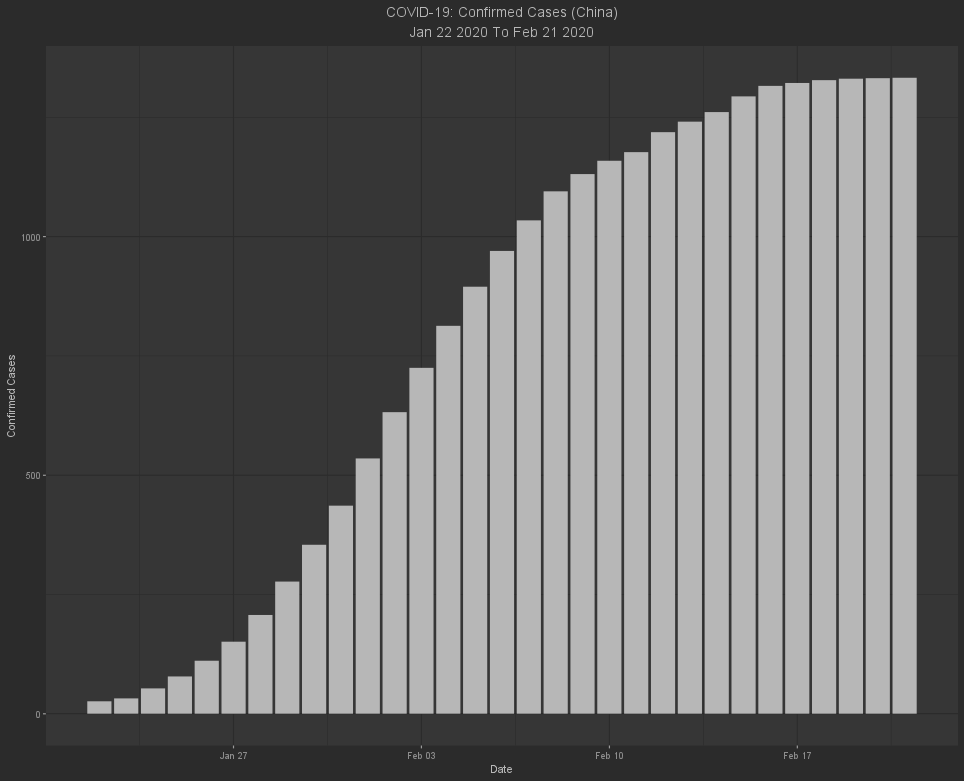
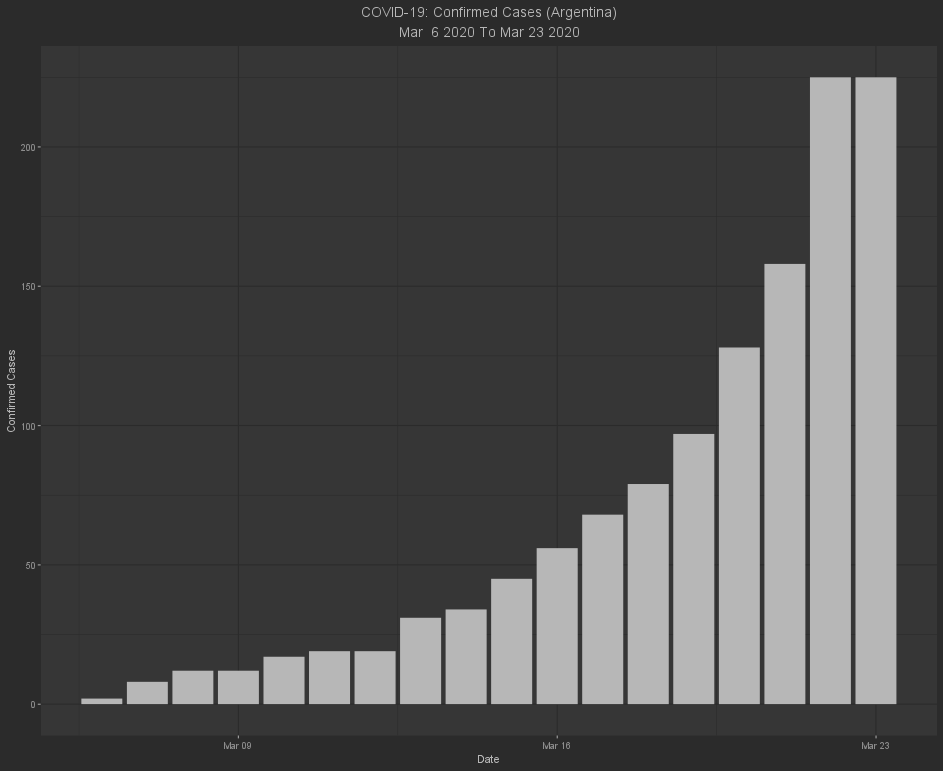
The plots generated by the function programmatically adjust their titles and subtitles to identify their content. Additionally, the dates along the X-axis are labeled at weekly intervals with the day of week beginning/ending arbitrarily set; for example, the first plot is every labeled at Wednesday and the second plot is labeled at every Tuesday.
I also wanted to consolidate regions (for example, there are 33 "China"s and I would've preferred to work with one China in which the record for a given date was the sum of all "China"s). While there are a handful of approaches for this in R, I struggled to find one that would work with this data set in particular. If I were working under Elastic/Kibana I would just pivot the data using a transform. Similarly in SQL, I would aggregate the records grouped by region where the date is the same. With this in mind, the best approach (for me, at least) to accomplishing this result would have been using the sqldf package in R. However, when trying to solve problems programmatically through code I typically prefer to use base packages as much as is possible, and I was already using three packages.
I believe that visualization is the most important facet of time series data. Visualization these types of data sets can enable data scientists to also plot forecasts. As an aside on forecasting with time series, it is often beneficial to forecast future data points (of course). However, it can be just as beneficial to be able to "backcast", that is to predict past, undocumented records using some form of statistical modeling. One example of this could be something such as an organization having just implemented a new service to analyze data (such as an ELK stack). If a given type of event happens only a few times in the few months following initial implementation, it very well could be considered anomalous. However, it can be very insightful to have a prediction of what may have already occurred prior to implementation as well as further on into the future, and that's where backcasting and forecasting can play a huge role in data science. The ability to visualize such predictions makes the information infinitely more presentable to management as well.
I wrote the following code in R to create a number of scatter plots using the ggplot2 library:
# Title : Module 9
# Objective : Multi-variate visualizations in R.
# Created by: Blake Rosenberg
# Created on: 3/14/2021
library(ggplot2)
df <- iris
head(df)
ggplot(df, aes(Sepal.Length, Petal.Length)) +
geom_point(aes(size = 3, col=Species)) +
geom_smooth(method = "lm", col='black', size=1) +
labs(x="Sepal Length", y="Petal Length", title="Correlation Between Sepal Length and Petal Length",
subtitle = paste0("R = ", round(cor(df$Sepal.Length, df$Petal.Length), 2))) +
theme(plot.title = element_text(hjust = 0.5), plot.subtitle = element_text(hjust = 0.5))
ggplot(df, aes(Sepal.Length, Petal.Length)) +
geom_point(size = 3) +
geom_smooth(method = "lm", col='black', size=1) +
facet_grid(~Species, as.table = F, shrink = F, scales="free") +
labs(x="Sepal Length", y="Petal Length")
df2 <- df[df$Species != "setosa", ]
ggplot(df2, aes(Sepal.Length, Petal.Length)) +
geom_point(size=5, aes(col=Species)) +
geom_smooth(method = "lm", col='black', size=1) +
labs(title="Correlation Between Sepal Length and Petal Length (Without Setosa)",
subtitle=paste0("R = ", round(cor(df2$Sepal.Length, df2$Petal.Length), 2)),
x="Sepal Length", y="Petal Length") +
theme(plot.title = element_text(hjust=0.5), plot.subtitle = element_text(hjust = 0.5))
df3 <- df[df$Species == "setosa",]
ggplot(df3, aes(Sepal.Length, Petal.Length)) +
geom_point(size=5, aes(col=Species)) +
geom_smooth(method = "lm", col='black', size=1) +
labs(x="Sepal Length", y="Petal Length", title="Correlation Between Sepal Length and Petal Length (Only Setosa)",
subtitle = paste0("R = ", round(cor(df3$Sepal.Length, df3$Petal.Length), 2))) +
theme(plot.title = element_text(hjust = 0.5), plot.subtitle = element_text(hjust = 0.5))
Towards the end of the last one I realized that I should've made a function for plotting the non-facet_grid affected scatter plots. If I was going to continue plotting and begin creating scatter plots with different variables than these, I definitely would have opted for a function to keep the code neat. However, this was just a few keystrokes to yank and paste (vim user here) here and there.
Now, let's go through these various plots!
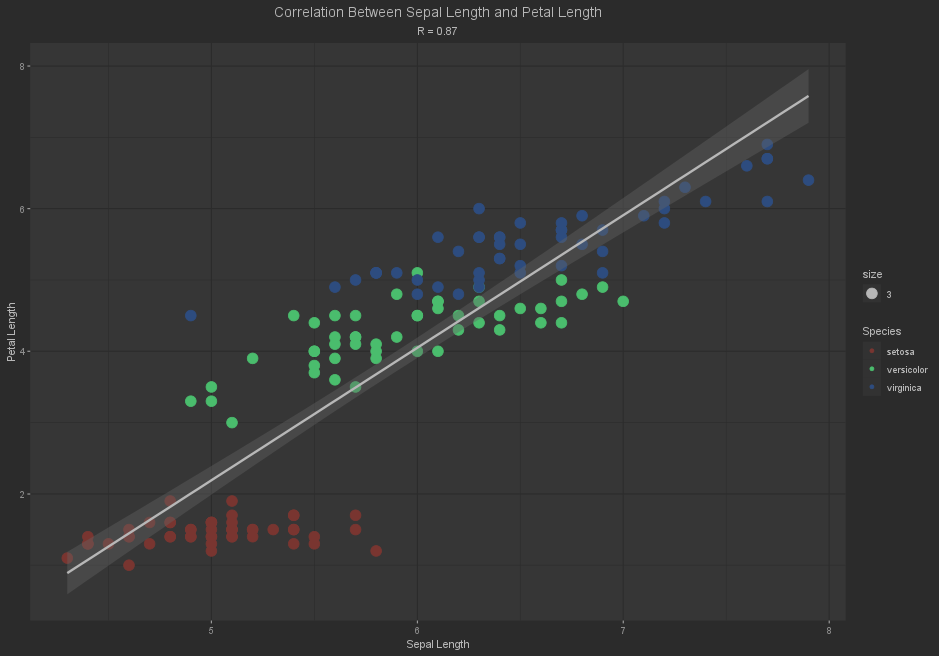
A correlation coefficient of 0.87, a pretty strong indicator for positive correlation between sepal length and petal length. However, the Setosa species seems to increase in sepal length without any real momentum for growth in the petal length. This is well demonstrated in the following faceted scatter plot of the same data.

There's clearly not much correlation between sepal length and petal length for the Setosa species, probably less than a quarter. So let's exclude it and re-plot.
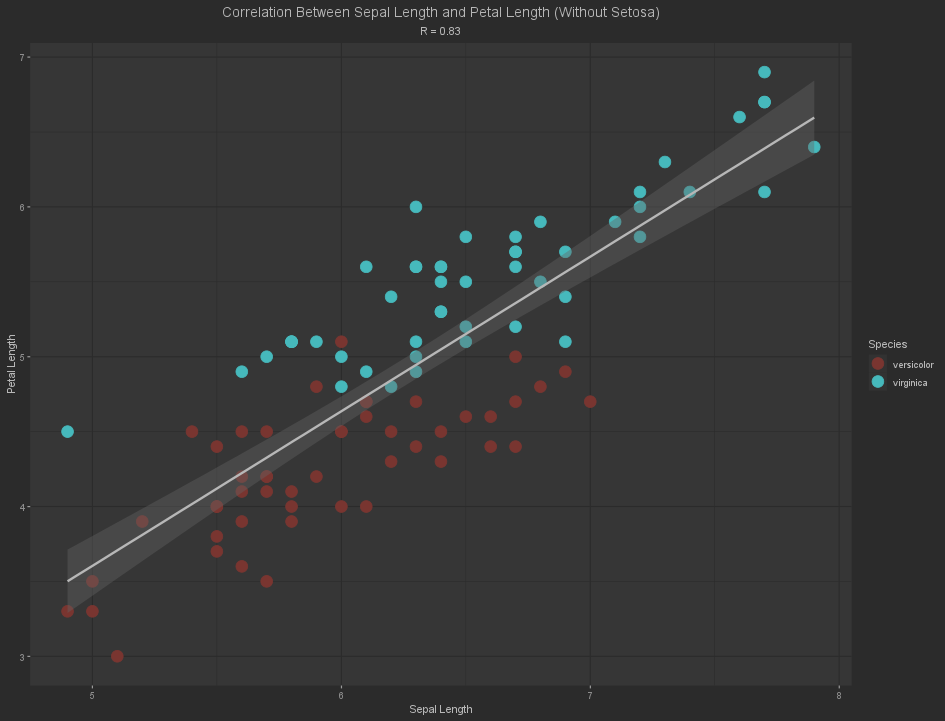
This is much cleaner and easier to look at than the first plot. However, the correlation coefficient has decreased! This makes some sense as we now have fewer values (which also directly effects the correlation coefficient) and the mean has shifted as a result of this and the exclusion of the actual Setosa values themselves. Out of curiosity, I plotted the Setosa species values on their own in my fourth and final plot for this assignment.
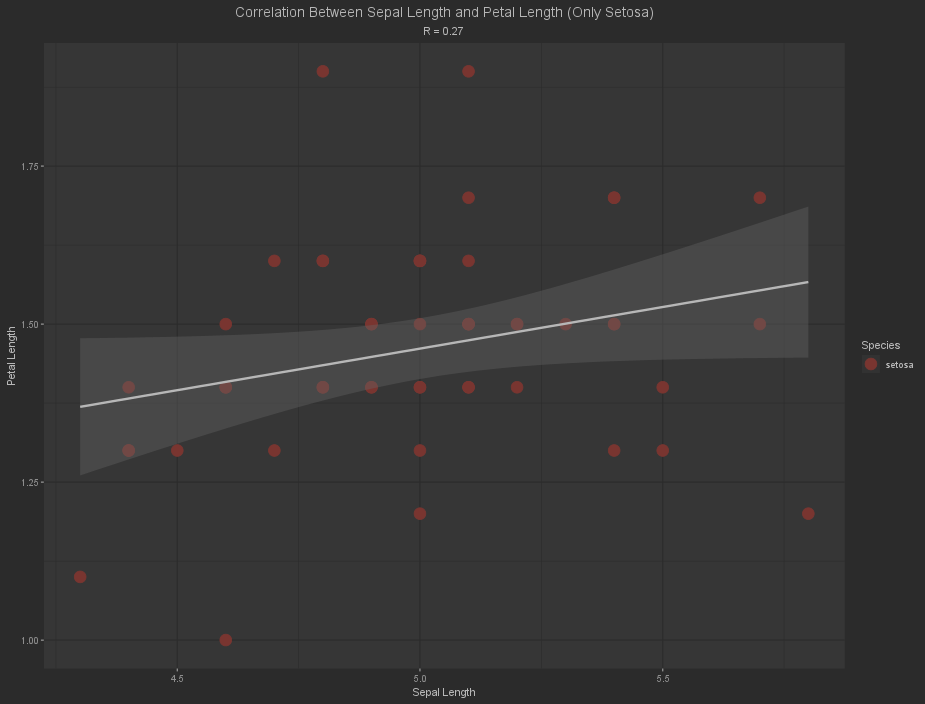
There is slightly more correlation than I had estimated but it is still quite weak. However, one thing is for certain amongst all of these plots. Species plays a vital role in a third-variable problem. I know (from quickly plotting them before settling on lengths for my variables) that the other 12 permutations of plotting the 4 quantitative variables in this data set do not correlate as well in any permutation as the sepal and petal lengths do. This narrows the scope of possibilities for the third-variable problem down to either the species or some value (nutrients, sunlight, location, moisture, flowering cycle position, etc) not included in this built-in iris data set.
I wrote the following code in order to create a scatter plot using the ggplot library in R:
# Title : Module 8
# Objective : Correlation analysis using ggplot2 for visualizations.
# Created by: Blake Rosenberg
library("ggplot2")
d <- mtcars
ggplot(d, aes(x=hp, y=mpg)) +
geom_point(aes(color=factor(disp))) +
geom_smooth(method="lm") +
labs(title="Fuel Efficiency and Horsepower", color="Displacement size (Cubic Inches)", x="Horsepower",
y="miles per gallon")
The resulting visual is a scatter plot of horsepower against fuel efficiency (as measured in miles per gallon) with the color for each point mapped to the reported displacement in cubic inches.
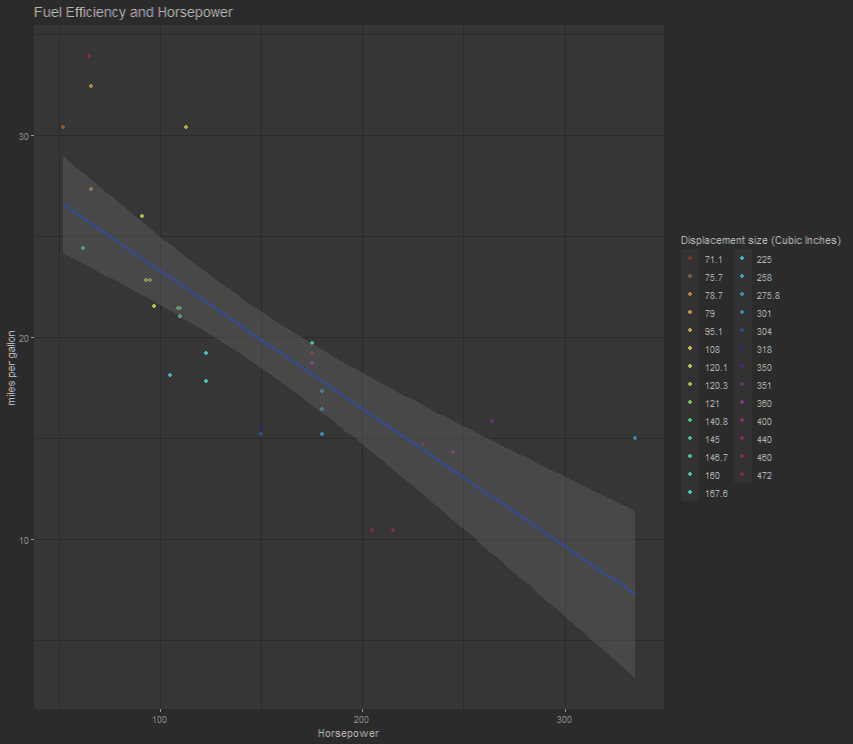
Normally I would prefer to have the displacement volumes bucketed instead of listing each one, especially as I am color blind and struggle distinguishing the light blues (along with the darker blues) from one another. However, bucketing these based on the color mapping would cause a handful of issues; they are not being correlated by displacement, so there would have to be quite a few points missing and the remaining ones would likely need to take the mean of their bucketed sub-components. The next large concern is that the largest engines are red, but so is the 71.1 cubic inch Toyota Corolla. However, the Toyota is clearly distinguished on the graph from the more voluminous engines as it is the most fuel efficient and has considerably less horsepower than most other cars on the graph.
I wrote the following code in R to accomplish this week's assignment on distribution analysis and comparing with scatter plots:
# Title : Module 7
# Objective : Perform distribution analysis on a provided data set.
# Created by: Blake Rosenberg
# Created on: 2/28/2021
df <- mtcars
histo <- hist(df$disp, col=sample(1:18,9), breaks=9, xlab="Displacement", main="Histogram of Displacement")
x <- min(df$disp):max(df$disp)
y <- dnorm(x, mean(df$disp), sd(df$disp)) * diff(histo$mids[1:2] * length(df$disp))
lines(x, y, col='black', lwd=3)
plot(df$disp, df$hp, xlab="Displacement", ylab="Horsepower", main="Dependence of Horsepower on Displacement")
This script generates two graphs from the built-in mtcars data set; one histogram with 9 buckets for the cars' engine volume or displacement, and one scatter plot attempting to compare displacement against horsepower. These graphs are presented below.
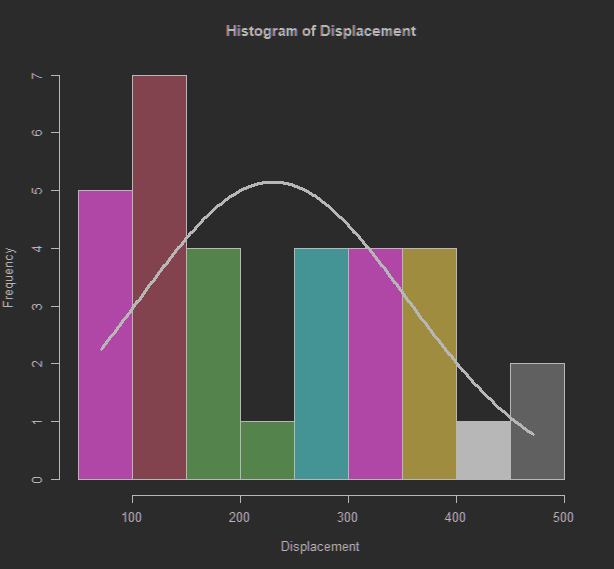
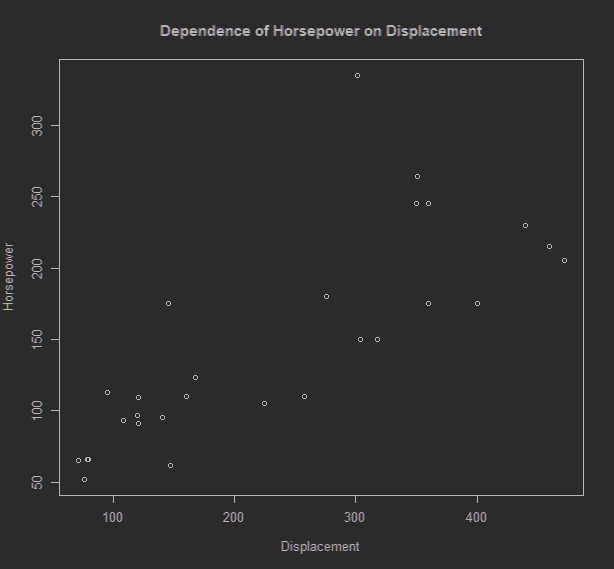
It may seem odd that I explicitly set the color for the line in the histogram to "black" yet the line in the graph is white. This is automated in my IDE of choice for R, PyCharm (at least until JetBrains adds support for R to DataLore) as I have the IDE set to dark mode which decides the shading scheme for plots. This ultimately exchanges white for black and vice versa. One other detail to note is that the colors for the histogram are randomly sampled and there is no seed set at runtime, so the histogram changes a considerable amount every time the script is run.
The scatter plot does well in demonstrating that there is a moderate correlation between displacement and horsepower, albeit with some noise. A lot of this noise may very well be explained away as intentional misrepresentation of figures of non-domestic cars. For example, the displacement listed for the Datsun 710 is incorrect as Datsun no longer used that engine by the time the original information was written in Motor Trends. The Mazda RX4 is another great example of misrepresented figures. The RX4 is listed as having six cylinders despite the fact that it has zero cylinders (rotary engine). Even the car with the highest horsepower (the most obvious outlier in the scatter plot) was documented incorrectly; with about 20 horsepower more than was advertised. Meanwhile, every single American car was listed as having far more horsepower and displacement than they had. Honestly, this data set may be more insightful if analyzed alongside US car sales from the same year, as the magazine (seemingly intentionally) misrepresented the American-made cars as far more desirable than they truly were.
As for the histogram, this pattern of misrepresented values is made even more noticeable. Most of the cars are in the 100 cubic inch bucket for displacement. Most of the cars in the data set are not American. Almost every non-American car falls into the first two buckets according to the underlying data, save for a couple Mercedes and the Maserati. Oddly enough, despite Motor Trends having nearly doubled the true value for displacement on the Ferrari Dino, it still falls short of moving into the third bucket.
For this assignment, I've again created two visuals but they both represent the same data: days per month in either a standard year or a leap year.
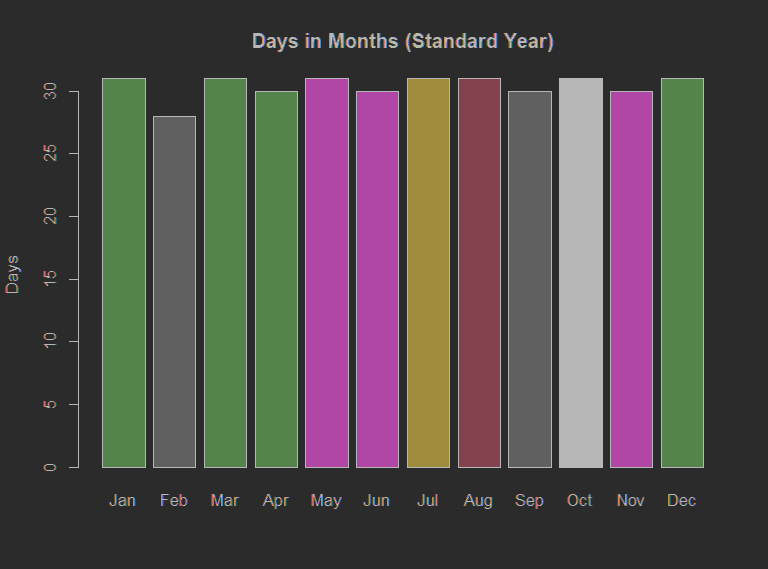
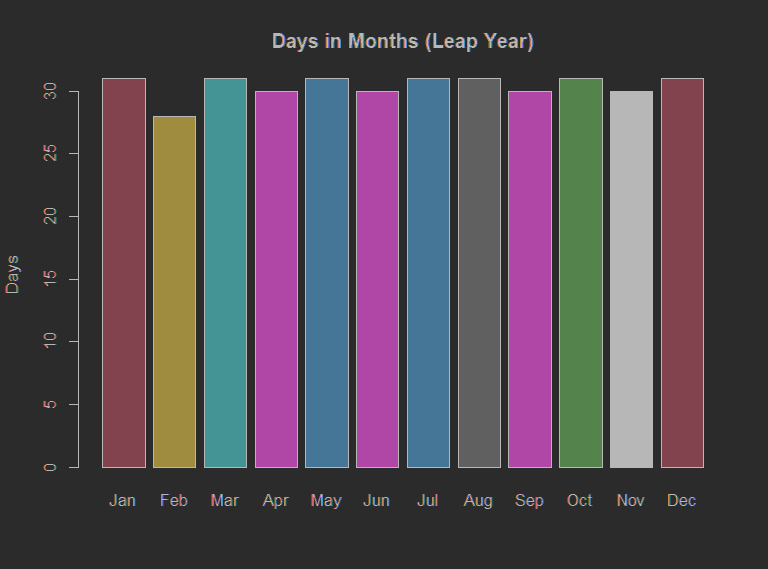
This is all handled in R with 6 lines of code including one import: Hmisc. The Hmisc package allows me to simplify determining the number of days in a given Date or POSIXt object without any fuss through its monthDays function. The data frames for standard and normal years are generated on one line each as follows:
Normal <-monthDays(as.Date(paste0(formatC(1:12, width=2, format="d", flag="0"), "-2021-01"), format='%m-%Y-%d'))
Leap <-monthDays(as.Date(paste0(formatC(1:12, width=2, format="d", flag="0"), "-2020-01"), format='%m-%Y-%d'))
In short, these lines run formatC against the range from 1 through 12 formatting each as an integer that is 2 characters wide (in other words, padding anything below 10 with a leading zero). These formatted values are then concatenated with either "2020-01" (to hardcode a leap year) or "2021-01" (to hardcode a standard year). Obviously month-year-day is not a very useful order for anyone, but fortunately this is immediately processed in the monthDays function as soon as the strings are cast to Date; resulting in an integer representing the number of days from that month of the given year.
Next, the header names were set for both data frames in a single line "names(Normal) <- month.abb ->names(Leap)". A quick hack utilizing the ability to change the direction of variable/value during instantiation in R. Finally, the plots are created on their own lines using the barplot method and sampling for random colorization:
barplot(Normal, col=sample(1:786, 12), ylab="Days", main="Days in Months (Standard Year)")
barplot(Leap, col=sample(1:786, 12), ylab="Days", main="Days in Months (Leap Year)")
These two visuals fit, albeit loosely, into Deviation Analysis as the mean is quite distinguishable. Even though the chart does not represent a normal distribution, the chart does well in distinguishing that, on average, a month has about 30 days in a standard year and slightly closer to 31 days in a leap year. It becomes apparent months deviate from this mean, especially for February in either form of year.
These two visuals do not align well with Yah's "Spotting Differences" as the underlying data is fairly univariate in nature.
For this assignment, Part to Whole and Ranking, I created two visuals: an area plot and a plot demonstrating the inverse Pareto nature of the data set. They are available as images below as well as on a public dashboard at Plotly.
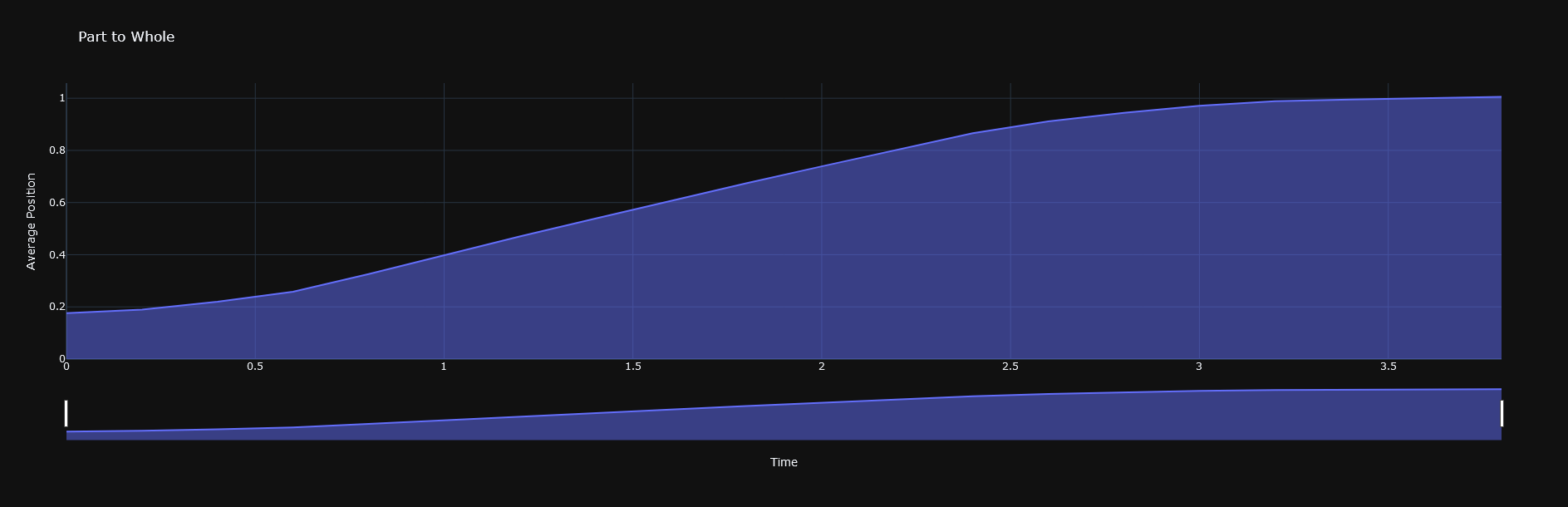
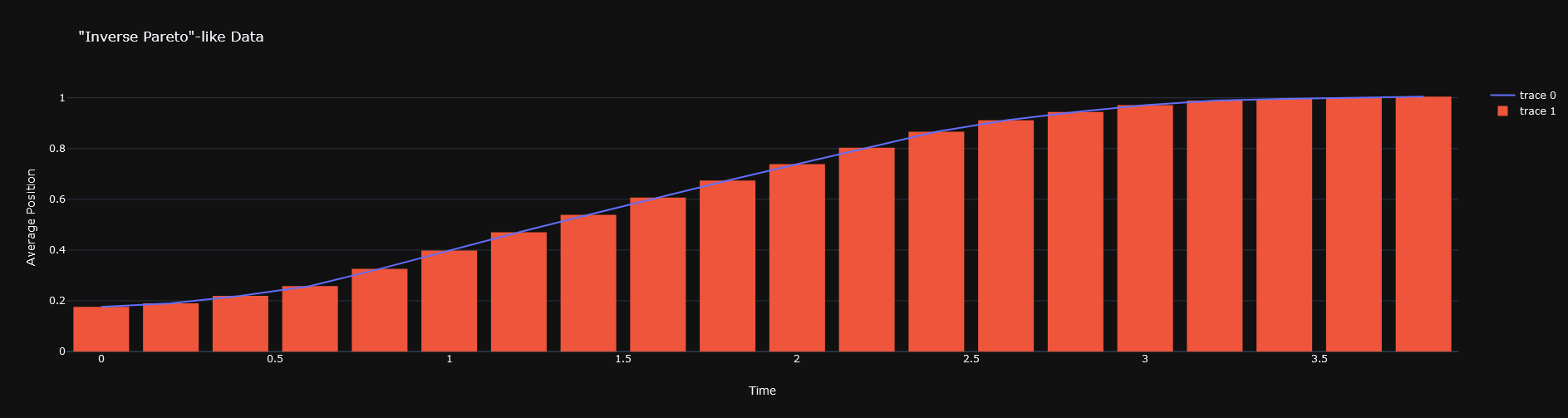
Both visuals do well in demonstrating that, as time passes, the average position increases. However, the inverse Pareto chart helps to point out that there is some form of resistance to growth at the point when three units worth of the time value has passed. This would become a bit more clear with more data, but a moving average (not pictured) would likely cross down around the last two or three bars in the inverse Pareto chart. In which case, it's not a stretch to guess that if the data set continued, then the later average position values would begin decreasing; which would likely normalize the distribution within the data set.
In closing, we had the option to use our own data sets for this assignment but I found more challenge in completing this assignment with less insight and control over the data set. I believe that this essentially led to a bettered understanding of the concept of Part to Whole, as I worked with a data set with which I had limited qualitative information on. Despite this limitation I was able to analyze and visualize the data in a much more abstract form than I would if I had used a data set of my choice.
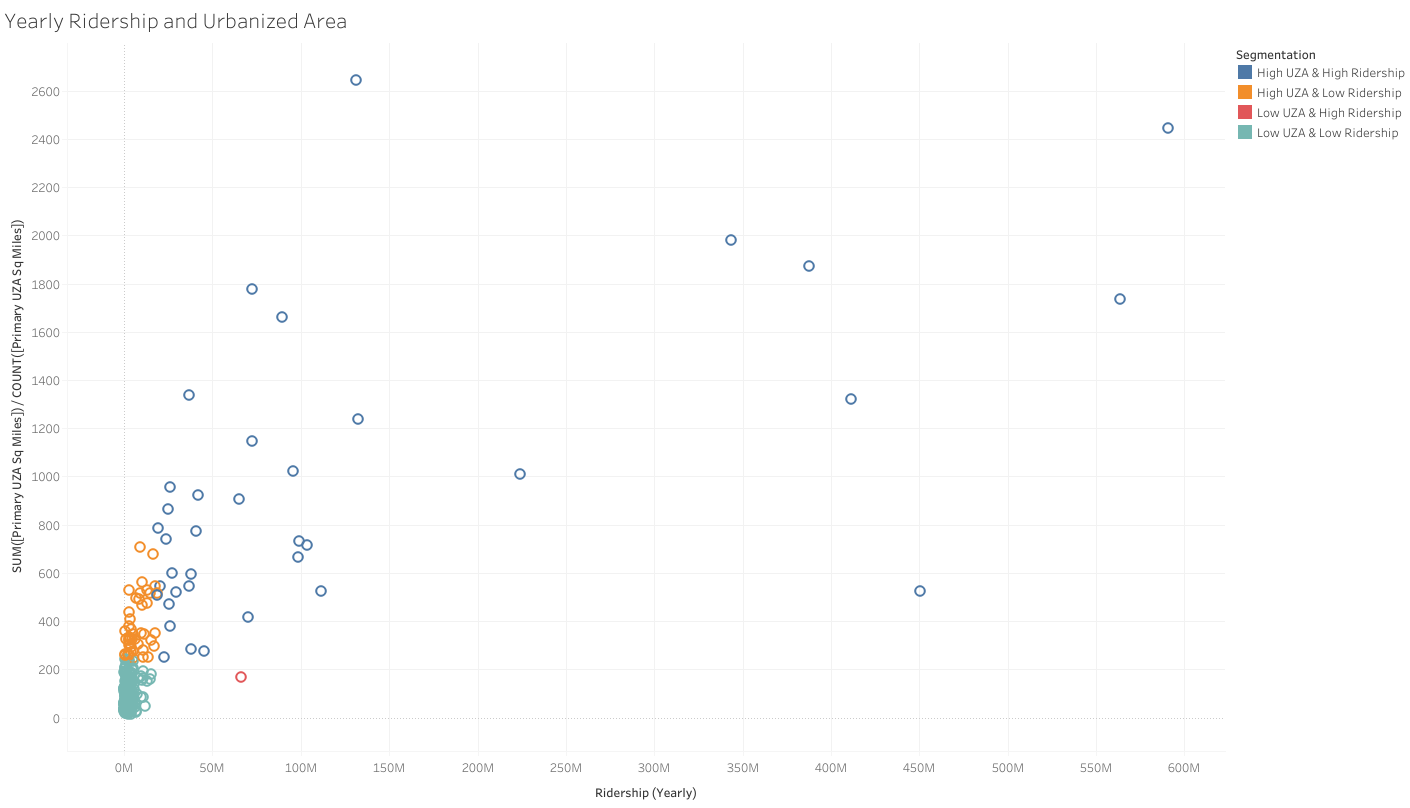
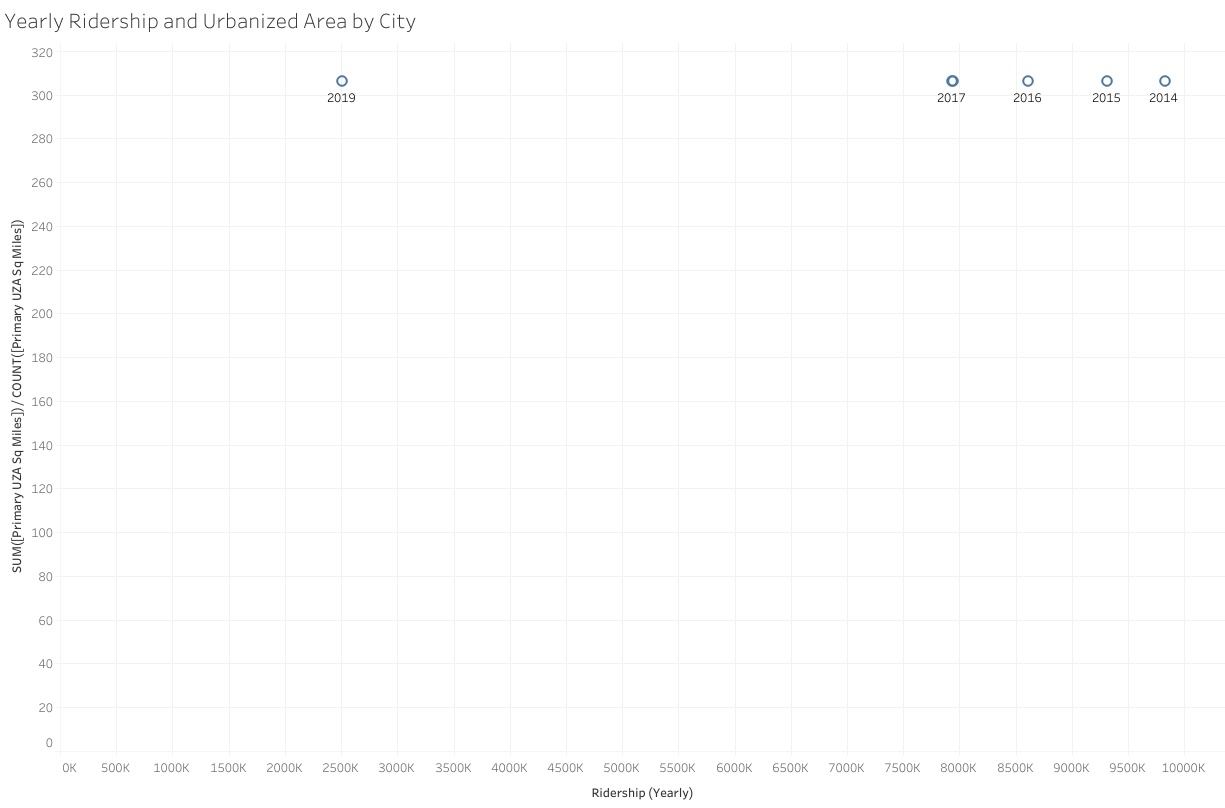
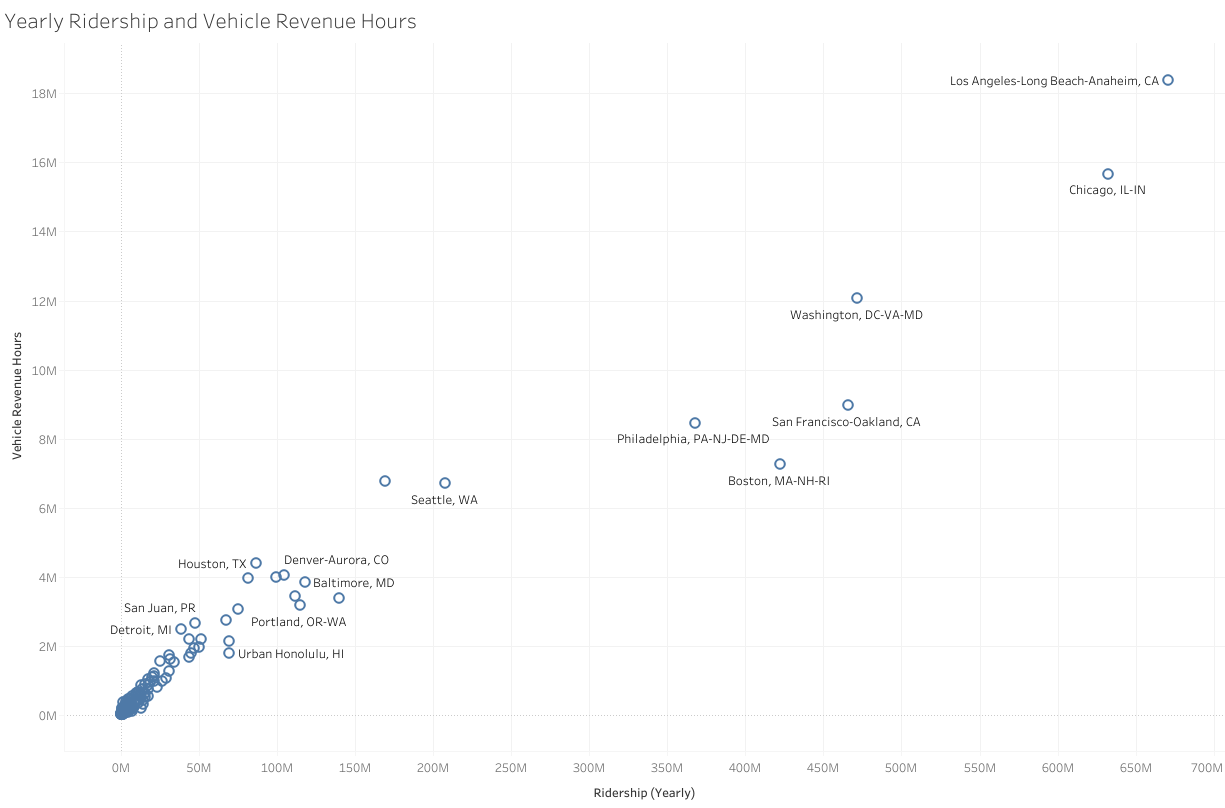
For this assignment, I created four worksheets. As usual, I will include images of each visual, but they can all be accessed through Tableau Public at https://public.tableau.com/profile/blake8440#!/vizhome/Module4_16127174848710/YearlyRidershipandUrbanizedArea and you can navigate among the sheets using the tabs near the top of that page.
.png?timestamp=1612723214147)
In most of these visuals, I have excluded NYC as it stretched the charts out by quite a bit, making the visuals very messy. It is worth noting that, according to the second worksheet (when filtered to New York), the Ridership for NYC Metro Area in 2019 was billions less than it was at any prior point in the data set, which goes as far back as 2014. However, this discrepancy is reconciled when inspecting the most recent copy of the original data source; not all months were recorded at the time the working data set was retrieved. As of current data, the ridership for New York Metro Area was just under 430 billion in 2019.
The final two visuals demonstrate a more coherent relationship: Yearly Ridership and Vehicle Revenue as measured in miles or hours; with the latter representing a more veracious relationship than the former. There's an obvious third variable problem at hand when attempting to correlate Urbanized Area with Yearly Ridership - possibly explained by less granular regional details such as whether it is a small college town with lesser UZA - these final two visuals are quite proper workarounds for this limitation (in my opinion, at least).
Take, for instance, Gainesville on the final visual. Gainesville has a fairly small urbanized area (87 square miles). However, it reached nearly 11 million Ridership in 2014. The final visual has great potential for discovering other bits of information from the underlying data set, because there is a slider for filtering the maximum value for Ridership for the given year which is also on a filter.
The creation of most of these visuals required using various Tableau features such as calculated fields. Additionally, I had to ensure that measures were not aggregated in undesirable ways,such as having the sum of all UZA values for a given point, rather than having the fixed value for that city. In my opinion, learning to use the more advanced features in Tableau can be very rewarding. For example, one can create a dashboard to monitor the underlying user database of a given application and set alerts to be triggered when certain conditions are not met; this can be mission critical for Business Intelligence professionals who are not able to change the application's code to send these sort of alerts itself.

The above visual is based on the one I created in my previous post, representing the status of fully stocked timberland area within the Northeastern Untied States using data from 2005. The edits made since the last assignment include a title, moving the legend onto the visual itself, and a simple vector of a tree. I believed that it would detract too much from the end-product if much more was done to the image. I still strongly support my previous argument that the most important details for this visual are within the original sheet's tooltip points.
For this assignment, I used Tableau to visualize a data set representing the stocking classifications of timberland areas in the northeastern United States. The visual is provided as a simple image below, but can be accessed (and interacted with) in full athttps://public.tableau.com/profile/blake8440#!/vizhome/NortheasternU_S_TimberlandStockbyRegionasof2005/Sheet.
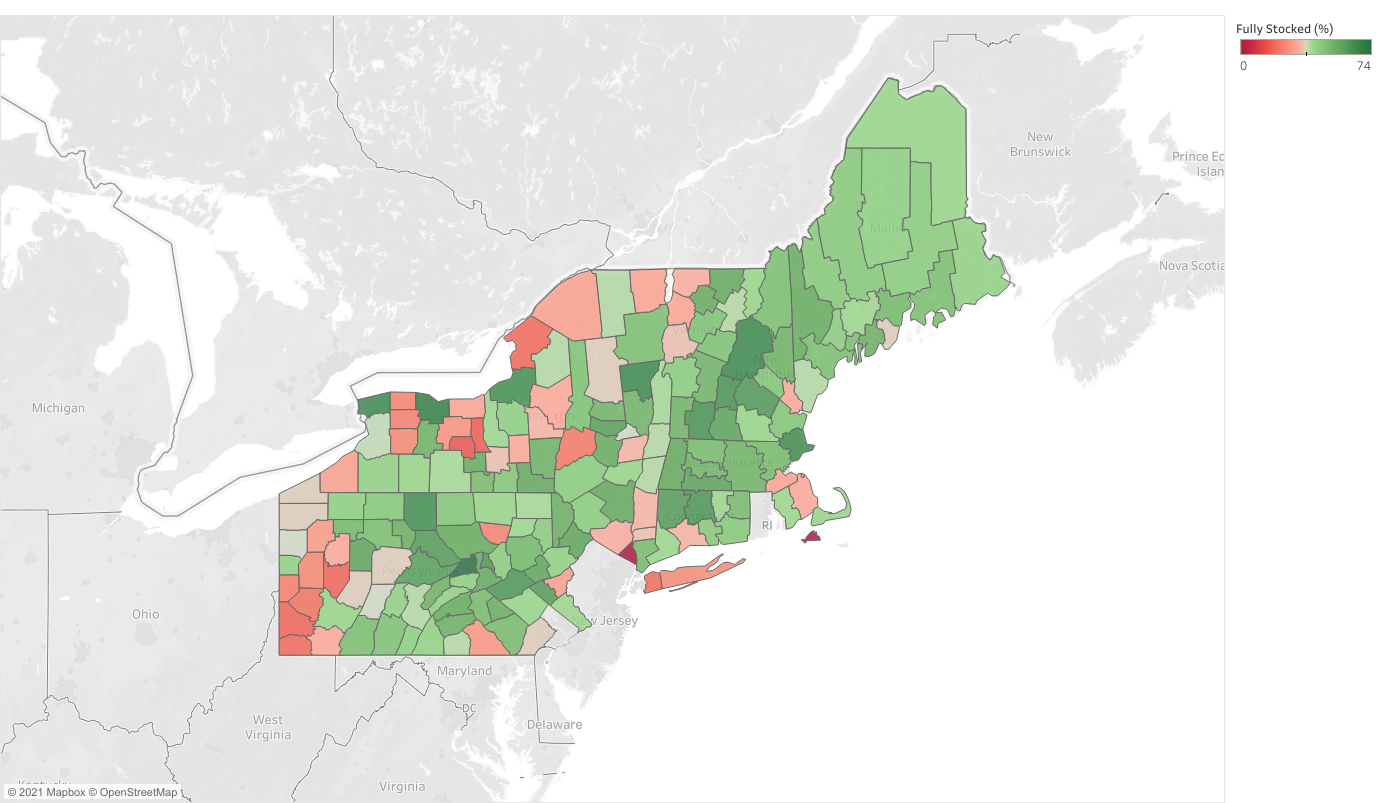
For clearer analysis, I would highly recommend following the link given above as this data is presented at the county level and there are multiple pieces of data given as tool-tips.
In order to create this visual I had to bring the contents of the original webpage's table in to Google Sheets and munge for a short while. Additionally, I had to go through all of the nearly-200 counties in the spreadsheet and determine the FIPS code in order to create a map at the county level in Tableau. Unfortunately, this meant doing it by hand but it is a much simpler task compared to datasets that contain counties from all states (as I've encountered in the past).
In Tableau I joined this data set with a shape-type spatial file that has geometries for each FIPS code; ensuring that the relationship was enforced as one-to-one with all FIPS values in the spreadsheet present in the spatial file (but not the other way around). Enforcing this relationship prevented identically named counties from summing together and rendering such counties invalid whilst also skewing the color gradient for most other counties. After adding in some tool-tip data, I excluded the geometries that aren't present in the dataset to bring the focus away from erroneously red-marked counties and back to the counties involved.
As can be seen in the visual, there are 2 counties that had 0% fully stocked timberland area: Dukes and Rockland. However there aren't any counties with a fully-stocked area at a percent higher than 74; as can be seen by the legend. At 74% fully stocked, Union Pennsylvania ranked the highest in the northeastern United Sates a of 2005.
Counties, such as Dukes and Rockland, being marked red at (or near) 0% is a bit misleading. For example, Rockland still has a considerable amount (65%) of medium stocked area. I considered basing the coloring off of medium stock because of this but it seems more fitting for optimal stock levels to be defined as high full-stock classifications.
Hoover, Coeli M.; Heath, Linda S. (2016): Appendix A. A table showing timberland area (as of 2005) in the seven states in the northeastern United States by county and by stocking class.. Wiley. Dataset. https://doi.org/10.6084/m9.figshare.3516089.v1
A visual analytic that has recently caught my eye is the following visualization from Bloomberg. 
The visual depicts how the United States uses its land (there are multiple other drill-down visualizations presented in a parallax-experience at the website)
One interesting part of this visual is just how much Iowa is comprised of cropland, as it is the state with the least government owned land you might expect more industrialization. The clusters of forest areas makes sense, as this aligns well with where most hardwood is milled in the country.