For my Final Project, I decided to pick up a project I'd abruptly ended a few years ago. The solution involves mining insider trading data from the SEC's publicly available EDGAR database. My original project was written in C#, so I did not bother with porting the existing code. Instead, I simply tried to remember as much of the process involved as I could without looking at the original code. As demonstrated below, this approach worked out well.
The script is available in the following Gist: https://gist.github.com/blarosen95/e36aaff51e7bf21d74bd186a7b960a90
A basic overview of the process in play is as follows:
First, the user must enter a stock's ticker symbol. This value is then stored in a variable in its lower-case equivalent. The script then searches as very large (seriously, I would not recommend opening the ticker.txt URL on line 22 unless you have at least 10GB of free RAM) crosswalk for this symbol in order to retrieve the equivalent Central Index Key (CIK) value.
From here on, it gets a bit more complicated. The next step involves pulling the transaction records for the given CIK. This is done with RCurl, and then munged to just the desired table element from the HTML file à la XML and rlist. The resulting data frame is further cleaned by dropping 3 undesired columns, followed by filtering on the Transaction Type column for Sales and Purchases using sqldf. It's worth noting that the maximum number of rows is 80 due to the target site's server-sided pagination feature.
Next, the most frequent trader is determined by sorting on the Owner CIK column. This column is preferred over Reporting Owner, as reporting owners' names may change due to events such as marriage but their personal CIK remains the same. At this point a new data frame is constructed using sqldf. The data frame is built to include only three, relevant columns: shares (the number of securities held by the entity after the transaction designated in a given row), dated (the date the transaction was filed on), and direction (the direction of the trade, A for acquisition and D for disposition).
Before continuing to detail the remainder of the process, some additional context is necessary. The filing date for a given insider's transaction is not (necessarily) the date the trade takes place, the SEC requires these individuals file for each transaction in advance as they have inside knowledge into the near-term direction of the company's stock. A few steps are taken in the remainder of the process to potentially turn this limitation into the user's benefit. Additionally, narrowing the data down to the most frequently transacting individual already helped to soften some of the impact of this limitation.
The next step is plotting the given individual's transactions on a scatter-plot. The number of shares held is plotted against the filing date. Additionally, the points are distinguished using one color for acquisitions and another for dispositions. Examples of this will be towards the end of this writing, in a section dedicated to the results of such back-testing.
The final step involves determining the price per share on the date the transaction was filed as well as on both the next market day (short-term reliability) and the most recent market day (as close to longer-term as is possible to retrieve without forecasting stock prices). This was one of the more complicated steps. It involves using curl to download the HTML contents of a webpage from MarketWatch, interpolating the given market dates and ticker symbol into the URL. The resulting information is used to calculate 2 different scores (one short-term, one longer-term) for each acquisition or disposition reported by the most frequently transacting insider.
A score of 0 occurs when there is no change in share price between the filing and short/longer term market dates. This is not as rare as it seems; insiders can file to trade on days when the market is closed, so the date of filing ends up being calculated as the next market day, and the next market day is still calculated as the first market day after the original filing date.
For dispositions, a score of -1 occurs when the share price increased at close of the next (with respect to short or longer term) market date; this would score as a 1 for acquisitions, as the individual paid less on the date filed. For dispositions, a score of 1 occurs when the share price decreased at close of the next date; this would score as a -1 for acquisitions, as the individual paid more.
This seems like it would be about as simple as pulling data from the SEC was, but it was in fact much more difficult. The following image shows a screenshot of the value desired from MarketWatch (the dollar figure to the right of "Closing Price:")

The closing price (along with the other price figures) are not text values, they are each their own image. Upon its discovery, I planned to work around this issue by using some form of OCR package. In the past, I've utilized OCR in Python to solve very large math problems from websites that limited me on submission time as well as providing the equation in a hard-to-read captcha style. However, I quickly realized this wouldn't be necessary here. The following HTML snippet shows the source for the quote data section (as was shown in the previous screenshot):
<div id="quotedata"> <span>Tuesday, December 01, 2020</span> <div> <img src="http://www.marketwatch.com/tools/investing/AMZN/number?countrycode=US&data=80.022,3$"/> <span>Closing price:</span> </div> <div> <img src="http://www.marketwatch.com/tools/investing/AMZN/number?countrycode=US&data=05.881,3$"/> <span>Open:</span> </div> <div> <img src="http://www.marketwatch.com/tools/investing/AMZN/number?countrycode=US&data=59.842,3$"/> <span>High:</span> </div> <div> <img src="http://www.marketwatch.com/tools/investing/AMZN/number?countrycode=US&data=81.751,3$"/> <span>Low:</span> </div> <div> <img src="http://www.marketwatch.com/tools/investing/AMZN/number?countrycode=US&data=M45.4"/> <span>Volume:</span> </div> </div>
The URL for the image associated with the closing price has a parameter called data (at the end of the URL). As can be proven by changing the numbers in the data parameter's value, this value actually creates the content of the image, the image is not pre-existing. More importantly, the image is created using this string in reverse. All I needed to do was munge out all the other data, reverse the URL, and munge it down to just the dollar figure. This is performed in the getPrice function (starts line 70).
The following figures are the results of back-testing this script against Sinclair Broadcast Group Incorporated (SBGI), Marathon Oil Corporation (MRO), and Amazon (AMZN).


The above figures for SBGI demonstrate a 100% longer-term reliability for David Smith's trades (whom I believe is their CEO), but only ~34.48% day-trading reliability. However, the immense volume of transactions from March 17th appropriately depicts a common trend among insiders of cashing in on the impact of COVID-19 on their own companies.


The above figures for MRO's CEO, Lee Tillman, demonstrate only a 50% day-trading reliability but 100% reliability for longer-term. Worth mention is that Tillman neither purchased nor sold any shares in MRO from mid 2018 (a sale) to the point when the pandemic knocked the price from ~$11 to ~$4; this would be important information to have but cannot always exist (mostly due to the previously mentioned pagination limit of 80 records). Tillman's shares are worth roughly $4 million (about 50%) more now than they were on his last transaction.


Finally, Amazon's Jeff Wilkes is the most frequently transacting insider for the companies past 80 insider transactions. Scoring a ~16% for short-term reliability and a 92% for longer-term reliability, there's not as much to say about the results from back-testing the project's current state against Amazon. However, this will be covered in part in the next and final section of this writing.
Closing Thoughts
The astute reader may have noticed that some plots depict handfuls of transactions in a single direction without enough in the opposite direction to account for an insider's change in total equity. This is accounted for in other forms of transactions such as gifts and awards, which were filtered out when the data set was narrowed down to purchases and sales only.
The results of this project would do well from further back-testing once the pandemic's effect on the US economy winds down. Of course insiders are buying into their company when the pandemic has pushed just about everyone lower; they will likely correct after the pandemic has settled. However, some insiders might be failing to factor in the fact that their business, as are all others, is a finite game with regards to game theory; Yes, the pandemic will end and the economy will eventually recover, but plenty of companies may no longer exist by then.
Finally, the program is fairly slow; these tables take minutes to generate. This is almost all due to the use of a for loop. From what I've read in the past, R does not perform for loops efficiently. There are alternative approaches available in the R language but this script would likely do best in another language (Python, Ruby, etc.). Further analyzing the results of this script (i.e. time series and forecasting)would likely do well in R, however, as that is what R is designed for.
This week's assignment explores time series and exponential smoothing. More specifically, the exponential smoothing model utilized is Holt-Winters.
In order to construct the required time series, I wrote the following code:
time <- paste(month.abb) # Lifehack
a <- c(31.9, 27, 31.3, 31, 39.4, 40.7, 42.3, 49.5, 45, 50, 50.9, 58.5)
b <- c(39.4, 36.2, 40.5, 44.6, 46.8, 44.7, 52.2, 54, 48.8, 55.8, 58.7, 63.4)
df <- data.frame(a, b)
colnames(df) <- c('2012', '2013')
charge_series <- ts(df)
As shown in the snippet above, I first had to reconstruct the dataframe. I accomplished this with the built-in constant month.abb (which is not used directly in either the dataframe or the time series but will show up later on in the code), as well as the two quantitative columns. After setting the column names, I instantiate a time series, charge_series, using the ts() method.
In order to complete the rest of the assignment, as well as plot the time series with the forecast, I wrote the following code:
charge_forecast <- HoltWinters(charge_series, beta = F, gamma = F)
charge_forecast
df$forecast <- charge_forecast$fitted[1:12, 1]
cf_series <- ts(df)
plot.ts(cf_series, axes = F, main = 'Charges', plot.type = 'single', col = rainbow(3), ylab='Charged')
axis(2)
axis(1, labels = time, at = seq(from = 1, by = 1, length.out = 12))
box()
legend("top", bty = 'n', lty = c(1, 1), col = rainbow(3), legend = c('2012', '2013', 'Forecasted'))
As for the outcome of the Holt-Winters model itself, the SSE is 835.38; quite high, suggesting quite a bit of variance. However, the results of both this time series and the smoothing model are much more easily interpreted once visualized. The following plot does just that.

The plot type is univariate for a few reasons. First, the data allows for it, especially with different colors for each line along with a corresponding legend. Additionally, multivariate plotting did not look as great with plot.ts() as it did with ts.plot() (which had each plot separated by a horizontal line but did not work out for getting the majority of the formatting achieved under plot.ts()). Finally, I ended up preferring this univariate plot over the multivariate plot available with built-in methods. Normally I would probably plot this data multivariate but continuing along the X-axis rather than the Y-axis; this sort of bucketing/drill-down is not (at least not immediately) apparent in plot.ts().
As is demonstrated by the plot, the forecast data is very similar to 2012, and only slightly more similar to 2013 than 2012's data was. As a closing note, this plot clarifies the fact that all three years have a moderately established month-to-month trend in direction as well as strength of eachchange.
This week's assignment explore chi-squared testing in the R language.
The following is the script that I wrote in order to solve this assignment:
# Title : Module 11 Assignment
# Objective : Chi Square Tests and Visualization in R
# Created by: Blake Rosenberg
# Created on: 11/8/2020
library(lattice)
vec_nominals <- c('Would choose same hotel again', 'Wouldn\'t choose same hotel again')
vec_beachcomber <- c(163, 64)
vec_windsurfer <- c(154, 108)
vec_colnames <- c('Beachcomber', 'Windsurfer')
hotel_df <- data.frame(vec_beachcomber, vec_windsurfer, row.names = vec_nominals)
colnames(hotel_df) <- vec_colnames
print.data.frame(hotel_df)
chisq.test(hotel_df)
boxplot(hotel_df)
The chi-squared test is performed on the dataframe formed by combining the various vectors. The results are as detailed below:
Pearson's Chi-squared test with Yates' continuity correction
data: hotel_df
X-squared = 8.4903, df = 1, p-value = 0.00357
In addition, we visualized the data from this assignment. I opted to use the boxplot function from the lattice package. The following image is the result of plotting the dataframe.

The main question for this assignment was whether the degrees of freedom was greater or less than 4; the degrees of freedom in this data is less than 4, sitting at 1.
In order to answer the first section of questions, I wrote the following code in R:
# Question 1A
one.hyp.null <- "H\u2080: The new machine is operating at or above manufacturer specifications (\u03BC \u2265 70)."
one.hyp.alt <- "H\u03B1: The new machine is operating below manufacturer specifications (\u03BC \u003C 70)."
print(one.hyp.null)
print(one.hyp.alt)# Question 1B
one.mu <- 70
one.sigma <- 3.5
one.n <- 49
one.xbar <- 69.1
one.alpha <- 0.05
one.conf <- 0.95
one.z_test <- (one.xbar - one.mu) / (one.sigma / sqrt(one.n))
one.z <- -1 * qnorm(one.conf + (one.alpha / 2))
if (one.z_test > one.z) {
sprintf("Cannot reject null hypothesis; %.2f is greater than %.2f", one.z_test, one.z)
} else {
sprintf("Null hypothesis can be rejected as %.2f is less than %.2f", one.z_test, one.z)
}# Question 1C
one.p <- pnorm(one.z_test)
if (one.p > one.alpha) {
sprintf("Cannot reject null hypothesis; p of %.3f is greater than the alpha of %.3f", one.p, one.alpha)
} else {
sprintf("Null hypothesis can be rejected as p (%.3f) is less than than alpha (%.3f).", one.p, one.alpha)
}# Question 1D
one.test2 <- (one.xbar - one.mu) / (1.75 / sqrt(one.n))
if (one.test2 > one.z) {
sprintf("Cannot reject null hypothesis; %.2f is greater than %.2f", one.test2, one.z)
} else {
sprintf("Null hypothesis can be rejected as %.2f is less than %.2f", one.test2, one.z)
}# Question 1E
one.test3 <- (69 - one.mu) / (one.sigma / sqrt(one.n))
if (one.test3 > one.z) {
sprintf("Cannot reject null hypothesis; %.2f is greater than %.2f", one.test3, one.z)
} else {
sprintf("Null hypothesis can be rejected as %.2f is less than %.2f", one.test3, one.z)
}
The output is annotated with the original questions below:
A. State the null and alternative hypothesis:
"H₀: The new machine is operating at or above manufacturer specifications (μ ≥ 70)."
"Hα: The new machine is operating below manufacturer specifications (μ < 70)."
B. Is there evidence that the machine is not meeting the manufacturer's specifications for average strength? Use a 0.05 level of significance:
"Cannot reject null hypothesis; -1.80 is greater than -1.96"
C. Compute the p value and interpret its meaning:
"Null hypothesis can be rejected as p (0.036) is less than than alpha (0.050)."
This answers B as "yes", but the original answer on B remains as no without this test.
D. What would be your answer in (B) if the standard deviation were specified as 1.75 pounds?
"Null hypothesis can be rejected as -3.60 is less than -1.96"
Answer would be "yes".
E. What would be your answer in (B) if the sample mean were 69 pounds and the standard deviation is 3.5 pounds?
"Null hypothesis can be rejected as -2.00 is less than -1.96"
Answer would be "yes".
To answer the second question, I wrote the following in R:
two.xbar <- 85
two.sigma <- 8
two.n <- 64
two.ci <- 0.95
calc2_a <- (1 - two.ci) / 2
calc2_error <- qnorm(two.ci + calc2_a) * two.sigma / sqrt(two.n)
calc2_left <- two.xbar - calc2_error
calc2_right <- two.xbar + calc2_error
sprintf("With %.0f%% confidence, \u03BC must lie between %.2f and %.2f (%.2f , %.2f).", two.ci * 100, calc2_left, calc2_right, calc2_left, calc2_right)
Which prints the following answer:
"With 95% confidence, μ must lie between 83.04 and 86.96 (83.04 , 86.96)."
Finally, for the third question, I wrote the following:
three.df_girls <- read.csv('Copy of module # 8.csv', header = FALSE, nrows = 5, skip = 1, row.names =)
three.df_girls <- as.data.frame(t(as.matrix(three.df_girls)))
three.df_girls <- three.df_girls[-c(5:9),]
colnames(three.df_girls) <- three.df_girls[1,]
three.df_girls <- three.df_girls[-1,]
three.df_girls <- three.df_girls[, -c(2:3)]
three.df_girls <- three.df_girls[, -3]
row.names(three.df_girls) <- paste0('Girl#', seq_len(3))
three.df_boys <- read.csv('Copy of module # 8.csv', header = FALSE, nrows = 5, skip = 8)
three.df_boys <- as.data.frame(t(as.matrix(three.df_boys)))
three.df_boys <- three.df_boys[-c(5:9),]
colnames(three.df_boys) <- three.df_boys[1,]
three.df_boys <- three.df_boys[-1,]
three.df_boys <- three.df_boys[, -c(2:3)]
three.df_boys <- three.df_boys[, -3]
row.names(three.df_boys) <- paste0('Boy#', seq_len(3))
three.df <- rbind(three.df_girls, three.df_boys)
three.df[] <- lapply(three.df, as.numeric)
three.pear <- cor(three.df$`Time spend on assignment`, three.df$Goals)
three.spear <- cor(three.df$`Time spend on assignment`, three.df$Goals, method = 's')
corrgram(three.df)
# However, I do not fully understand how to interpret this correlogram plot.
three.df$Gender <- c(rep('Girl', times = 3), rep('Boy', times = 3))
ggplot(three.df, aes(`Time spend on assignment`, `Goals`)) +
geom_point(size = 9, aes(color = Gender)) +
geom_smooth(method = 'lm') +
labs(title = paste('Pearson\'s r:', three.pear, '\nSpearman\'s \u03C1:', three.spear)) +
ylab('Goals') +
xlab('Time Spent on Assignment') +
theme(plot.title = element_text(hjust = 0.5))
A lot of this code is just munging the data (which I previously converted to CSV outside of the script) so as to remove unneccesary columns and rows. I also brought the csv in as two separate data frames: one for girls and one for boys. Before munging either of them, I transposed them so that variables weren't handled as the occurences.
Do note that I am calculating correlations on y (time spent on assignment) ~ x (Goals) with boys and girls considered as one for the calculations. However, the scatterplot at the end of this submission distinguishes between boys and girls using point color.
I used the corrgram package as instructed, the resulting plot is shown below:

However, I do not fully understand how to interpret such a plot -- even after reading the manual -- so I went ahead and created an additional plot; this time a scatterplot à la ggplot2:
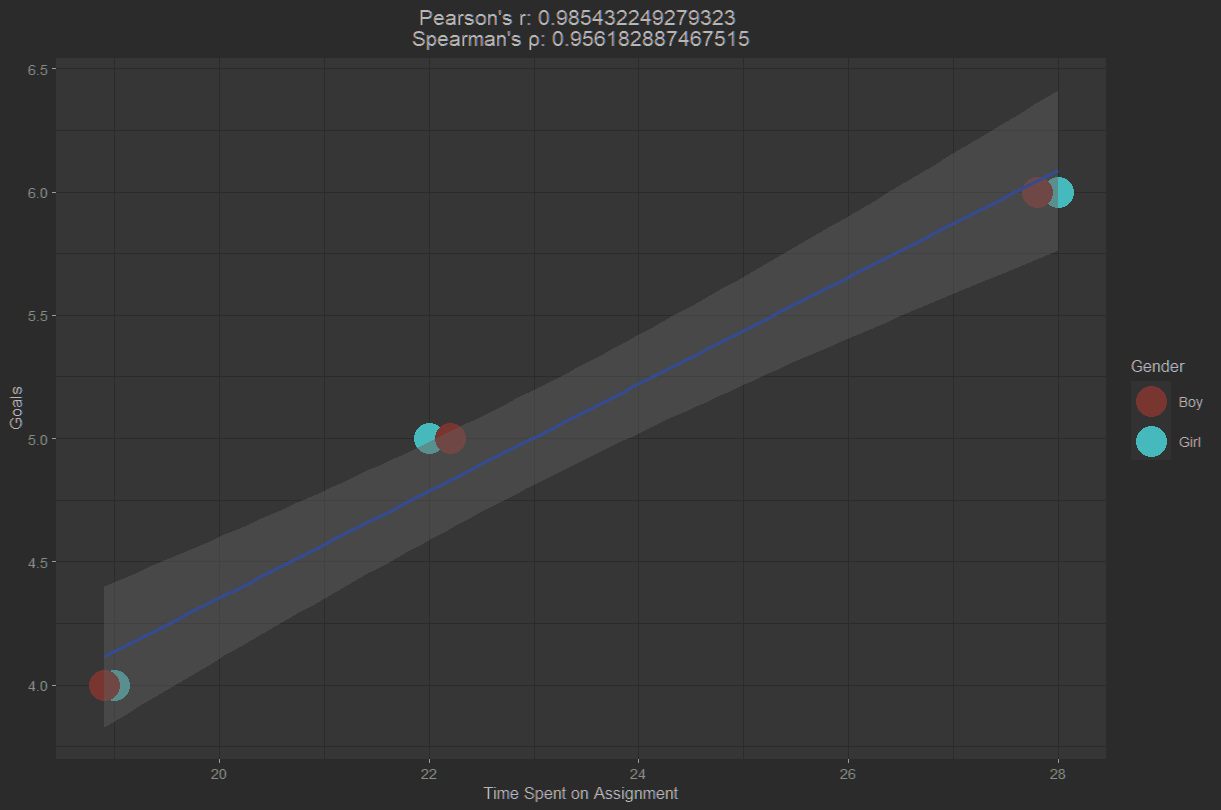
This scatterplot interpolates the values for Pearson's r and Spearman's rho into the title.
Closing notes: I wanted to try out the xkcd theme I enjoy messing around with when using ggplot in python. However, I could not get the font to load even after installing it to my system fonts (probably a Windows issue as most SO questions regarding troubleshooting the extrafont package were from unix users). While I could've spun up a docker container for this module's project, I would have then had other issues involving HAXM which I need for Kotlin projects. As such, I decided not to troubleshoot the matter any further as it was a triviality to begin with.
In order to determine a 95% confidence interval estimate of µ, for x̄ = 85, σ = 8 and n = 64, I wrote the following code in R:
one_xbar <- 85
one_sigma <- 8
one_n <- 64
one_ci <- 0.95
calc1_a <- (1 - one_ci) / 2
calc1_error <- qnorm(one_ci + calc1_a) * one_sigma/sqrt(one_n)
calc1_left <- one_xbar - calc1_error
calc1_right <- one_xbar + calc1_error
sprintf("With %.0f%% confidence, µ must lie between %.2f and %.2f", one_ci*100, calc1_left, calc1_right)
The result is "With 95% confidence, µ must lie between 83.04 and 86.96".
In order to determine a 99% confidence interval estimate of µ, for x̄ = 125, σ = 24 and n = 36, I wrote the following code in R:
two_xbar <- 125
two_sigma <- 24
two_n <- 36
two_ci <- 0.99
calc2_a <- (1-two_ci)/2
calc2_error <- qnorm(two_ci+calc2_a) * two_sigma/sqrt(two_n)
calc2_left <- two_xbar - calc2_error
calc2_right <- two_xbar + calc2_error
sprintf("With %.0f%% confidence, µ must lie between %.2f and %.2f", two_ci*100, calc2_left, calc2_right)
The result is "With 99% confidence, µ must lie between 114.70 and 135.30".
In order to determine a 99% confidence interval estimate of µ, for x̄ = 0.99, σ = 0.02 and n = 50, I wrote the following code in R:
three_sigma <- 0.02
three_n <- 50
three_xbar <- 0.99
three_ci <- 0.99
calc3_a <- (1-three_ci)/2
calc3_error <- qnorm(three_ci+calc3_a) * three_sigma/sqrt(three_n)
calc3_left <- three_xbar - calc3_error
calc3_right <- three_xbar + calc3_error
sprintf("With %.0f%% confidence, µ must lie between %.4f and %.4f gallons.", three_ci*100, calc3_left, calc3_right)
The result is "With 99% confidence, µ must lie between 0.9827 and 0.9973 gallons."
While it may be easy to argue that any complaint about the discrepancy between the expected and actual amounts of paint per 1-gallon can is weak due to the difference being less than 38 milliliters per can, the individual in the question is not the end consumer but rather a reseller. As the reseller of this paint, there are a few important details to note: resellers buy in wholesale quantities, resellers' customers purchase amounts greater than or equal to what is required for their projects.
On the subject of wholesale quantities: while I haven't personally called around to ask for real-life figures, it's not farfetched to estimate that a mom-and-pop supply store probably orders a few hundred cans per order (for simplicity, let's just say 250 1-gallon cans per order) and big businesses such as Home Depot probably receive thousands of 1-gallon cans per order per location (again, let's simplify this as 1200 1-gallon cans per order for any given location). For the hypothetical mom-and-pop store, this comes out to about 9.5 liters per order; approximately 2.5 cans worth of paint missing per order. For the hypothetical Home Depot location, the discrepancy per order is approximately 12 cans worth of missing paint. With this data, the validity in a supplier's complaint of missing paint leans fairly heavily on their profit margins.
However, it's not worth theorizing the amount of money lost regardless of the suppliers profit margins due to the second factor I'd previously mentioned: customers purchase a number of 1-gallon cans greater than or equal to what is required for their projects. I'd imagine it would be quite a marvel of engineering to design a project that only requires cans of paint that will be completely consumed in the process (i.e. without needing part of an extra can of paint). Typically, customers will be buying an extra can of paint regardless of whether the cans are exactly one gallon or slightly under one gallon. While the manager of such supply stores may have the moral obligation to inform customers of the discrepancy between advertised content and average content per 1-gallon can, they certainly have no right to complain to the manufacturer. This discrepancy further increases their profit per order. To help demonstrate this concept, consider the following:
A customer's project requires 40.5 gallons of paint. In a (nearly) perfect world, this would require purchasing 41 cans of paint. With the lower end of the estimate for µ (0.9827), this requires purchasing 42 cans of paint.
As the supply store is selling the cans of paint rather than using them, this discrepancy simply increases their sales. While most suppliers would likely issue a refund if the customer opened a 1-gallon can of paint to find it was only half full, customers are highly unlikely to ask for a refund (let alone notice the difference) on the basis of a few missing drops of paint per can.
In order to determine a 95% confidence interval estimate of µ, for x̄ = $1.67, σ = 0.32 and n = 20, I wrote the following code in R:
four_n <- 20
four_xbar <- 1.67
four_sigma <- 0.32
four_ci <- 0.95
calc4_a <- (1-four_ci)/2
calc4_error <- qnorm(four_ci+calc4_a) * four_sigma/sqrt(four_n)
calc4_left <- four_xbar - calc4_error
calc4_right <- four_xbar + calc4_error
sprintf("With %.0f%% confidence, µ must lie between $%.2f and $%.2f for all cards in the store.", four_ci*100,calc4_left,calc4_right)
The result is "With 95% confidence, µ must lie between $1.53 and $1.81 for all cards in the store."
This result can aid the store owner to estimate the mean price for all cards in their store as falling between $1.53 and $1.81. Further, this value can help to determine whether or not to lower prices on cards set at over $1.81, depending on how well the store sells them.
In order to determine the required sample size, for Z=1.96, E=5 and σ=15, I wrote the following code in R:
five_z <- 1.96
five_c <- 5
five_sigma <- 15
five_n <- ceiling( ( (five_z * five_sigma) / five_c) **2)
sprintf("A sample size of %d is required.", five_n)
The result is "A sample size of 35 is required."
I decided on the following for my null and alternative hypotheses:
Null = In terms of USF, no significant correlation exists between state funding and cost to students (H_0 : p = 0).
Alternative = In terms of USF, there is a correlation between decreases in state funding and cost to students (H_a : p =/= 0).
I decided on this one-tailed test of correlation because I am also writing a paper for another class on the same subject. As such, I had sources handy but still had to do a minor amount of munging.
I went a bit further here and did some analysis on the data I've already found (operational budget: https://www.usf.edu/business-finance/resource-management-analysis/documents/operating-budget-19-20.pdf | Tableau dashboard: http://usfweb.usf.edu/ODS/SystemFacts/Enrollments.aspx )
I wrote up the following code in R to both look at rejecting the null hypothesis, and plotting the relevant data:
six_data <- read.csv("C:\\Users\\TheJerkBox\\Desktop\\Adv Stats\\USFOperatingBudgetDecadeHistory.csv")
six_data <- six_data[-1]
six_data <- rename(six_data, c("X"="FY2011", "X.1"="FY2012", "X.2"="FY2013",
"X.3"="FY2014", "X.4"="FY2015", "X.5"="FY2016",
"X.6"="FY2017", "X.7"="FY2018", "X.8"="FY2019",
"X.9"="FY2020"))
row.names(six_data) <- c("STATE APPROPRIATIONS", "TUITION & FEES",
"CONTRACT & GRANTS", "AUXILIARY", "OTHER")
six_nullHyp <- "In terms of USF, there exists a significant correlation between state funding and cost to students (H_0 : p = 0)."
six_altHyp <- "In terms of USF, there is a positive correlation between decreases in state funding and cost to students (H_a : p =/= 0)."
six_a <- 0.05
six_crit.left <- -0.632
six_crit.right <- 0.632
t_six_data <- transpose(six_data)
row.names(t_six_data) <- c("FY2011", "FY2012", "FY2013", "FY2014", "FY2015",
"FY2016", "FY2017", "FY2018", "FY2019", "FY2020")
colnames(t_six_data) <- c("V1"="STATE APPROPRIATIONS", "V2"="TUITION & FEES",
"V3"="CONTRACT & GRANTS", "V4"="AUXILIARY",
"V5"="OTHER")
six_r <- cor(t_six_data$`STATE APPROPRIATIONS`, t_six_data$`TUITION & FEES`)
t_six_relevant <- t_six_data[1:2]
t_six_relevant <- rename(t_six_relevant, c("STATE APPROPRIATIONS"="Funding",
"TUITION & FEES"="Cost"))
t_six_relevant$Year <- row.names(t_six_relevant)
ggplot(t_six_relevant, aes(x=Funding, y=Cost)) + geom_point(size=9, aes(color=Year)) +
geom_path(color='mediumturquoise', size=1.25) + geom_smooth(method='lm') +
labs(title = paste('r =', six_r, '\nSignificant if ≤', six_crit.left, "or ≥", six_crit.right)) +
theme(plot.title = element_text(hjust = 0.5))
if (six_r < six_crit.left || six_r > six_crit.right) {
sprintf("With a correlation coefficient of %f, there is sufficient evidence to reject the null hypotheses on the basis that a significant linear relationship exists between state funding and cost to students at USF.", six_r)
six_direction <- "negative"
if(sign(six_r) == 1) {
print("This statistically significant correlation suggests that, as state funding for USF increases, funds sourced from tuition & fees also increase. Likewise, as funding decreases, collections from tuition & fees also decrease.")
} else {
print("This statistically significant correlation suggests that, as state funding for USF increases, funds sourced from tuition & fees decrease. Likewise, as funding decreases, collections from tuition & fees increase.")
}
} else {
sprintf("With a correlation coefficient of %f, there is not sufficient evidence to reject the null hypotheses.", six_r)
}
six_third_variable_frame <- t_six_relevant[7,]
six_third_variable_frame[2,] <- t_six_relevant[9,]
six_third_variable_frame$Enrolled_Fulltime <- c(35704,35650)
# Full-Time Enrollment for 2017 and 2019 sourced from Tableau dashboard made available by USF's Office of Decision Support
six_third_variable_frame$DollarCostPerStudent <- (six_third_variable_frame$Cost / six_third_variable_frame$Enrolled_Fulltime) * 1000000
six_third_variable_frame
The following is the data as plotted:
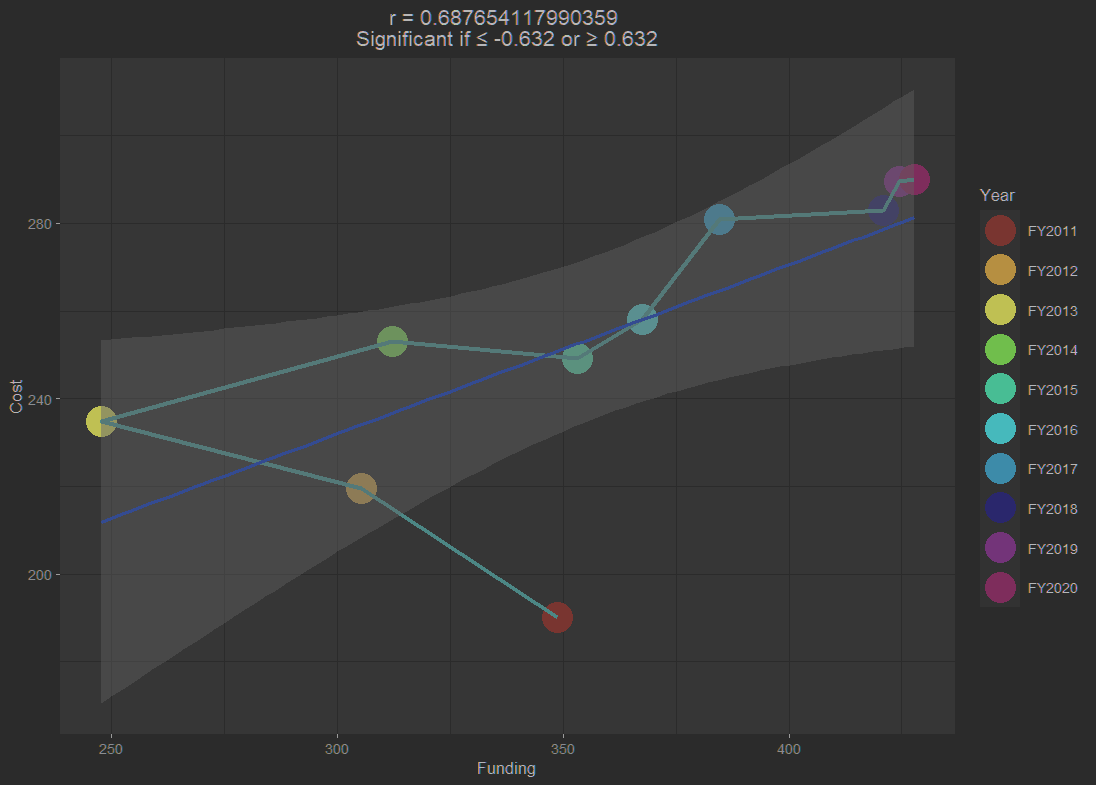
Investigating statistical significance of the correlation between state funding and tuition and fees at USF, r = 0.6876541, returned the following result:
"This statistically significant correlation suggests that, as state funding for USF increases, funds sourced from tuition & fees also increase. Likewise, as funding decreases, collections from tuition & fees also decrease."
Already aware of a massive third variable problem, I rolled up a new dataframe which included only fiscal years 2017 and 2019. I then added the full-time enrollment data (from the Office of Decision Support's Tableau dashboard for enrollment data from 2017 to 2019) for these years. Finally, I calculate the cost per student for each of these two years by dividing the funds sourced from tuition & fees by the number of students enrolled full-time the same year.
The resulting dataframe is as follows:
Funding Cost Enrolled_Fulltime DollarCostPerStudent
FY2017 384.5 281.0 35704 7870.267
FY2019 424.5 289.5 35650 8120.617
While only for part of the plotted data, this accounts for the fact that the correlation between state funding and funds sourced from tuition & fees was not affected by the third-variable problem of tuition & fees funding increasing due to increased students.
As someone who struggles with probability theory, I not only found this week's assignment challenging but I also learned quite a bit. In fact, I had to contact my boss to help me understand the table presented in the assignment's prompt but after that, it was fairly smooth sailing.
In order to get going I recreated the table as a dataframe in R as follows:
tab_one <- data.frame("B" = c(10, 20), "B1" = c(20, 40), row.names = c("A", "A1"))
The following image shows how this table appears in RStudio:

I used this dataframe to create another dataframe containing relative frequencies:
tab_one.rel_freq <- tab_one / sum(tab_one)
As it appears in RStudio:

I then used the following code to calculate probabilities for event A, event B, and event A or event B:
prob_a <- sum(tab_one.rel_freq["A",])
prob_aprob_b <- sum(tab_one.rel_freq$B)
prob_bprob_either <- prob_a + prob_b - prob_a * prob_b
prob_either
The output is as follows:
> prob_a
[1] 0.3333333> prob_b
[1] 0.3333333> prob_either
[1] 0.5555556
In order to determine if these are disjoint events, P(A or B) = P(A) + P(B), I wrote the following code:
isDisjoint = prob_either == prob_a + prob_b
ifelse(isDisjoint, "True, these are disjoint events.", paste("False; whereas P(A or B) is", prob_either, "P(A) + P(B) is", prob_a + prob_b))
The resulting output, selected based on the result of the ternary-like conditional statement used:
[1] "False; whereas P(A or B) is 0.555555555555556 P(A) + P(B) is 0.666666666666667"
In order to proof the provided calculation for Bayes Theorem, I wrote the following code:
tab_two <- data.frame("Usual Days" = c(5/365,360/365), "Forecast" = c(0.9, 0.1), row.names = c("Will Rain", "Will Not Rain"))
tab_two
tab_two.bayes <- (tab_two$Forecast[1] * tab_two$Usual.Days[1]) / (tab_two$Forecast[1] * tab_two$Usual.Days[1] + tab_two$Forecast[2] * tab_two$Usual.Days[2])
tab_two.bayes
The resulting table is as appears below:

Additionally the value assigned to tab_two.bayes is 0.1111111
It is true that the weatherman's predictions are only going to be correct ~11% of the time considering the fact that it only has been raining 5 days a year for the past few years.
This may be due to the fact that, while the weatherman correctly predicts rain 90% of the time, there are still only 5 days for the weatherman to be right assuming a non-anomalous year with only 5 days of precipitation.
For this assignment I started by creating three vectors: case_vector, screeners_vector, and violations_vector as shown in the code snippet below.
case_vector = c(1, 2, 3, 4, 5, 6, 7, 8, 9, 10, 11, 12, 13, 14, 15, 16, 17, 18, 19, 20)
screeners_vector = c(287, 243, 237, 227, 247, 264, 247, 247, 251, 254, 277, 303, 285, 254, 280, 264, 261, 292, 248, 253)
violations_vector = c(271, 261, 230, 225, 236, 252, 243, 247, 238, 274, 256, 305, 273, 234, 261, 265, 241, 292, 228, 252)
In order to establish a high-level on association between boarding screeners and discovered security violations I divided the two as shown below:
screeners_vector / violations_vector
Which gave me the following output:
[1] 1.0590406 0.9310345 1.0304348 1.0088889 1.0466102 1.0476190 1.0164609 1.0000000 1.0546218 0.9270073 1.0820312 0.9934426 1.0439560 1.0854701 1.0727969
[16] 0.9962264 1.0829876 1.0000000 1.0877193 1.0039683
From this very high-level analysis it appears as though there's roughly one security violation discovered for every boarding screener present.
As shown below, I've created a dataframe, case_df, which contains the screeners_vector and violations_vector as rows. I then calculate Pearson's Sample Correlation Coefficient and assign the value to a variable, r. Before printing out the value of r.
case_df <- data.frame(screeners_vector, violations_vector)
r <- cor(case_df, use="all.obs", method="pearson")
r
Given the output below, I've determined the value of r_xy to be 0.8375321.
screeners_vector violations_vector
screeners_vector 1.0000000 0.8375321
violations_vector 0.8375321 1.0000000
This is indicative of a very strong positive correlation.
In order to calculate and display Spearman's Rank Coefficient, I added the following code to my script:
p <- cor(case_df, use="all.obs", method="spearman")
p
Given the output below, I've determined the value of p to be 0.7575423.
screeners_vector violations_vector
screeners_vector 1.0000000 0.7575423
violations_vector 0.7575423 1.0000000
This is indicative of a fairly strong positive association between ranks.
Finally, I used R to create a scatter plot in which the number of screeners is the independent variable, and the number of discovered violations is the dependent variable.
The code:
plot(case_df$screeners_vector, case_df$violations_vector)
The resultant plot:
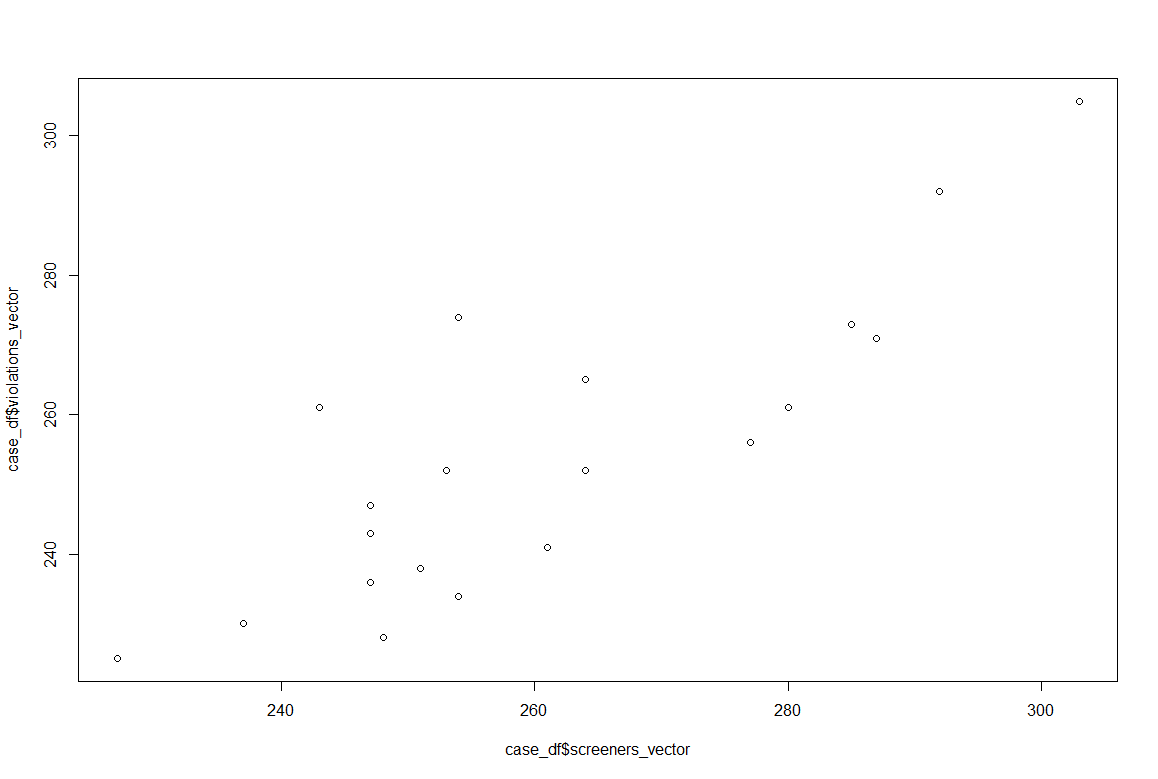
With how much work can go into calculating Pearson's r, I was pleasantly surprised to find it (and Spearman's p) as ready-to-use arguments in R.